Success
Looking for the best EPUB reader app for your iPhone or iPad in 2026? I loaded the same books into each of the main contenders, pushed a side-loaded library into the thousands of titles, and lived in them for weeks to see which ones actually hold up. This guide compares five readers, justRead, Apple Books, Kindle, KyBook 3, and Yomu, on the things that change your day-to-day reading: interface, fonts, colors, margins, orientation, large-library handling, what each one really costs, and how you get your own files in.
Fully rewritten and expanded in July 2026 with hands-on notes from the current versions of every app.
I'm Petr Jahoda, and I make justRead. So read this as a maker's field guide, not a neutral review. I still tested every app here on my own iPhone and iPad, I use several of them, and where a competitor does something better than justRead I say so out loud. My goal is that you pick the reader that fits you, even when that reader is not mine.
There is no single "best" reader for everyone. Someone who buys every book from one store wants something very different from a reader with thousands of side-loaded EPUBs and strong opinions about typography. So under each pick I say who it is for, not just where it lands.
How I tested this. I put the same mixed shelf into every app: a couple of dozen books spanning clean commercial EPUBs, messy public-domain scans, a few image-heavy PDFs, and some EPUB3 files that carry their own embedded audio, on both an iPhone and an iPad. I did not run a stopwatch or a synthetic benchmark. I read in these apps for weeks, in bed, on trains, in bright sun and in the dark, and paid attention to the small frictions that only surface after the novelty wears off: how fast the library scrolls once it holds thousands of titles, how many taps a common setting takes, whether a book remembers my place across both devices, and what breaks when a file is not perfectly formed. Where I could not verify something first-hand, I say so instead of guessing.
Quick comparison: EPUB readers for iPhone and iPad in 2026
| What matters | justRead | Apple Books | Kindle | KyBook 3 | Yomu |
|---|---|---|---|---|---|
| Bring your own fonts | Yes: 200+ built in, plus ZIP import | No (14 built in) | No (8 built in) | Yes (CSS/fonts) | No |
| Margins to true zero | Yes | Limited, buried | Limited | Via CSS | Basic |
| Custom text/background color | Full RGB + true black | 6 presets | 4 presets | Via CSS | A few themes |
| Per-book layout memory | Yes | No | No | Partial | No |
| Orientation (landscape) lock | Yes | No | Yes | Yes | No |
| Read straight from cloud folders | iCloud, Dropbox, Drive, OneDrive | Apple only | Amazon only | Dropbox/WebDAV | iCloud |
| Two-way Calibre Content Server sync | Yes | No | No | Read-only via OPDS | No |
| OPDS catalogs | Gutenberg, Internet Archive, custom | No | No | Yes | Limited |
| Reading statistics | Deep | Minimal | Minimal | No | Minimal |
| Actively developed in 2026 | Yes | Yes | Yes | Stalled (2019) | Yes |
| Price | Trial, then sub or $79.99 lifetime | Free | Free | ~$4 one-time | Free + $7.99 Pro |
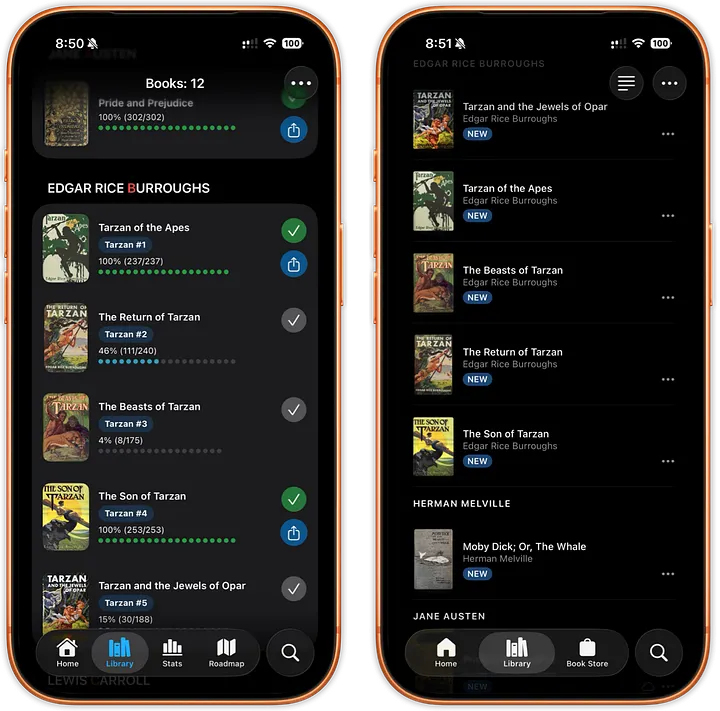
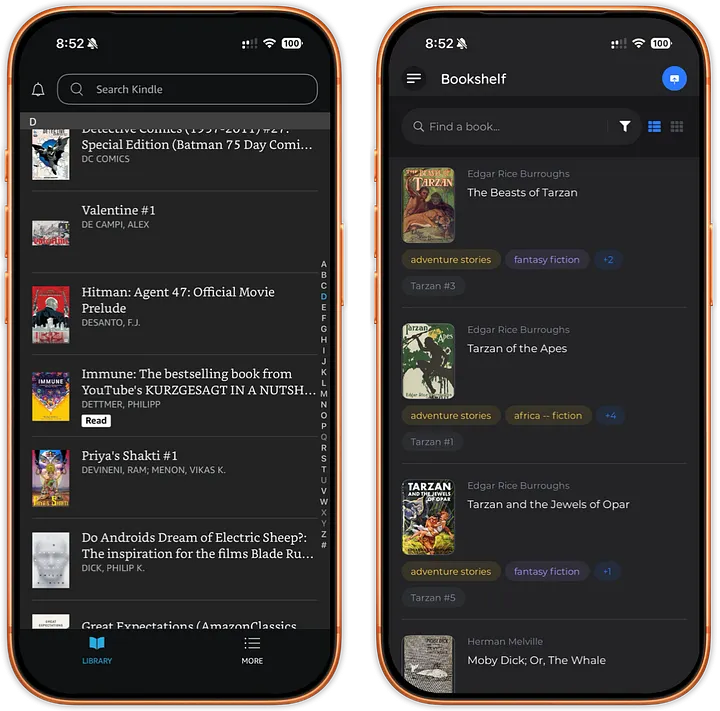
Every app here runs on iPhone and iPad. justRead is iOS-only by design and is built specifically around side-loaded EPUBs, real typography control, and large personal libraries.
1. justRead - best overall for readers who own their EPUBs
justRead is the reader I recommend first if you own your files and want real control over how a page looks. It follows Apple's design language, so navigation feels native, and it keeps the settings that matter within a tap or two instead of burying them three menus deep. The whole reading panel is a single sheet you pull up over the page and adjust while the text updates live underneath, so you tune a book while you are reading it, not by leaving to hunt through a preferences screen.
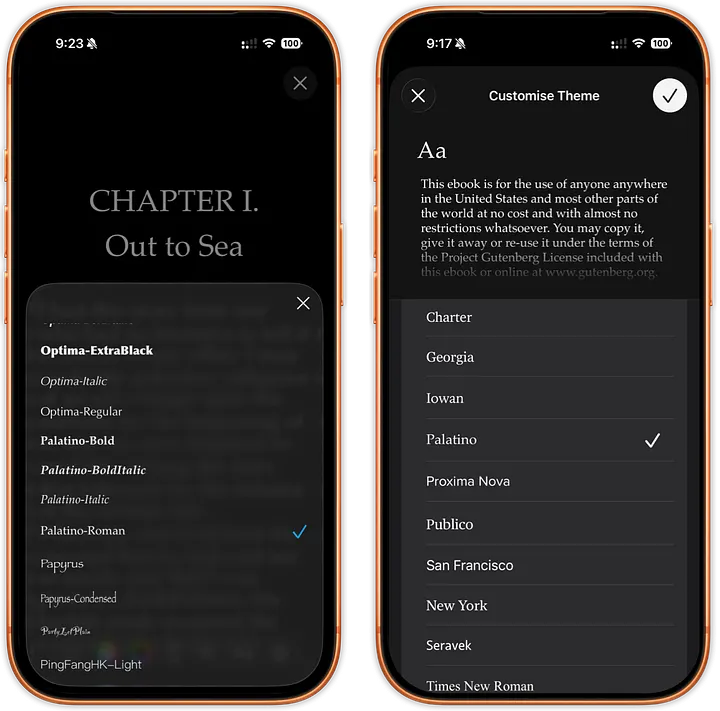
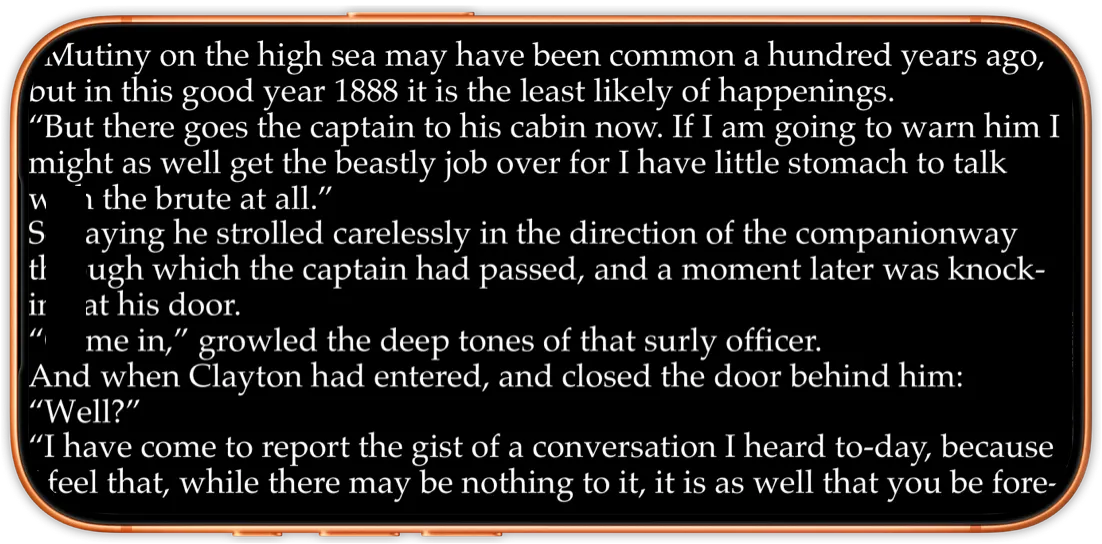
Customization is where it pulls ahead. You can import your own typefaces as a ZIP of .ttf/.otf files on top of the 200-plus fonts that ship built in. You can drag every margin down to true zero, so text really does run to the edge of the screen, and set any text and background color with a full RGB picker rather than choosing from a handful of presets. Pure black gives you a real OLED dark mode where the pixels switch off. Best of all, each book remembers its own typography, so a dense academic PDF and a fast paperback never have to share one layout. If typography is your thing, the reading customization options are the heart of the app.
It is built for scale and for messy real-world libraries. It reads directly from iCloud, Dropbox, Google Drive, or OneDrive folders without copying every file into a new sandbox, so a large collection stays put where you keep it and books open in place rather than after a long import. Even with the library well into the thousands of titles the grid stayed responsive on both my iPhone and iPad; scrolling did not stutter and covers kept up. If you maintain your library in Calibre, two-way Calibre sync keeps reading progress, ratings, and highlights in step in both directions, not just a one-time desktop conversion. It also speaks OPDS, with Project Gutenberg and the Internet Archive built in plus any custom catalog you add. On the bigger screen, the EPUB reader for iPad shifts to a two-column landscape layout and keeps separate iPad and iPhone settings, which matters more than it sounds: the margins and font size that feel right on a phone are rarely the ones you want on a 13-inch iPad.
Beyond the basics it adds genuinely useful extras: a built-in dark mode with automatic day/night switching, a 20-20-20 eye-care timer, detailed reading statistics, highlights in six colors with one-tap Readwise and Markdown export, a page-curl animation if you like it, and CBZ and CBR comics that open in the same library as your books, in a two-page spread on iPad and right to left for manga. Audio is three separate things now: Read Aloud speaks any EPUB that has no narration of its own, highlighting the sentence and underlining the current word while the page turns itself, with eight English neural voices you can download and run on the device; read-along narration plays the synced audio that some EPUB3 books ship inside them; and a built-in audiobook player handles audiobook files you already own, with speed control, a chapter list, and a sleep timer. You can push a finished book straight to a Kindle or a PocketBook from inside the app, and vote on the public roadmap.
Best for: readers with their own EPUB library who want full control over fonts, colors, margins, and per-book layout, and who want the app to still be here in five years.
Trade-offs: iOS only, and it is a subscription (with a free trial and a one-time lifetime option) rather than a store you buy books from. No Apple Pencil markup, and no MOBI, AZW3, FB2 or DJVU. More on the honest limits below.
2. Apple Books - best for casual readers in the Apple ecosystem
Apple Books is the safe default. It is pre-installed, follows Apple's design standards, syncs cleanly across your Apple devices, and handles a large library without fuss. If you mostly want to open a book and read without thinking about settings, it is hard to fault, and for anything bought from Apple it is genuinely the smoothest experience on the list.
The ceiling is customization. You get 14 fonts with no way to add your own, six color themes, and margin control that is both limited and hidden several levels deep: you tap the page, open the Aa menu, then dig into the theme and layout options before you find spacing at all, and even then you are nudging presets rather than dragging a margin to zero. There is no per-book typography, so a setting you change for one book quietly changes it for the next, and no landscape lock, so reading on your side in bed means the page keeps flipping orientation on you. Its "night" theme is a dark gray rather than true black, so it never reaches the deep OLED contrast some readers want.
Best for: casual readers who value zero setup and tight Apple integration, and whose books mostly come from Apple's store.
Trade-offs: no custom fonts, shallow customization, no landscape lock, dark-gray rather than true-black night mode, and everything lives inside Apple's library.
3. Kindle - best if you live in Amazon's store
Kindle on iPhone and iPad is excellent for books you buy from Amazon, with rock-solid Whispersync that keeps your place, highlights, and notes in sync across every device you own. Send-to-Kindle now accepts EPUB, which is a real improvement over the old conversion dance, but the flow is still one file at a time: you email or upload each book to your personal Send-to-Kindle address, wait for it to appear, and repeat. That is fine for the occasional document and punishing for a whole shelf, and there is no folder or Calibre workflow to lean on. As a reader for your own EPUBs it is the most locked down here: eight fixed fonts, no custom fonts, four color themes, and settings scattered across tabs. It does support landscape lock, which Apple Books still does not.
Best for: readers whose library is mostly Amazon purchases and who value flawless cross-device sync.
Trade-offs: awkward for bulk side-loading, fixed fonts and themes, no real library-management story for your own files.
4. KyBook 3 - the classic power-user pick, now stalled
For years KyBook 3 was the answer whenever someone wanted deep customization on iOS: CSS-level control, custom fonts, OPDS, WebDAV, and a genuine power-reader feature set for around four dollars, paid once. If you already own it and it runs fine on your device, it can still do a lot, and there is nothing quite like it at that price.
The honest problem in 2026 is momentum. Its last meaningful release was version 0.7.8, back in February 2019. It still launches and still does a lot, but you are running software that has not been touched in years, and it shows in small ways as newer iOS versions move on around it. The same fate has already caught the once-beloved Marvin, which is effectively dead. Abandoned readers are a real risk on iOS, where each yearly OS update can break an app that nobody is maintaining, and there is no support line when it does. I built justRead partly to be the actively-developed successor to that exact category: the customization depth power readers loved, but shipped and supported now, with a roadmap you can vote on.
Best for: existing owners who want maximum control and are comfortable with the compatibility risk.
Trade-offs: no meaningful updates since 2019, aging interface, uncertain future on new iOS versions.
5. Yomu - clean, minimalist, actively maintained
Yomu is the tidy indie option. It has been maintained since 2013, which is the reassuring part, reads multiple formats, syncs over iCloud, and gets out of your way with a clean interface. Its customization is lighter than justRead's or KyBook's, and it does not chase the power-reader corners like exact margins or per-book themes, but it is pleasant and reliable, with a free base and a $7.99 Pro upgrade. One specific limit is worth flagging: Yomu cannot load your own custom fonts, so if bring-your-own typography is the whole reason you are shopping, it rules itself out before the other trade-offs even matter.
Best for: readers who want a simple, good-looking, actively maintained reader without a deep settings menu.
Trade-offs: no custom fonts, limited typography control, no Calibre two-way sync, no deep statistics.
The real cost math: subscription, one-time, and abandoned
Price on iOS is rarely just a number, so it is worth doing the honest math on what you are actually buying.
Apple Books and the Kindle app are free, but the price is lock-in, not zero. You pay by keeping your library inside one company's store and accepting whatever customization ceiling that company sets. If your books come from that store anyway, it is a fine trade, and arguably the best deal on the page.
KyBook 3 is the classic one-time purchase, roughly $3.99 paid once, and on paper that is the cheapest way to own a powerful reader forever. The catch is that cheap forever only works if forever actually arrives. Its last real update was in February 2019, and an unmaintained reader is one bad iOS release away from being worth nothing, with no one to email when that day comes. Marvin, another beloved pay-once reader, has already crossed that line. A one-time price is only a bargain while the app keeps running.
Yomu splits the difference: free to use, with a one-time $7.99 Pro unlock, and it has been quietly maintained since 2013.
justRead is the honest subscription. There is a 14-day free trial, then $4.99/month or $29.99/year, and if you dislike subscriptions there is a $79.99 one-time lifetime option that never renews. A subscription is the least romantic model, but it is what pays for the app to still be actively developed in five years, which, as KyBook and Marvin show, is the thing that quietly matters most on iOS. If you would rather pay once and be done, the $79.99 lifetime tier exists precisely for you.
How you actually get your own EPUBs into each app
Side-loading is where these apps feel most different, because it is the part reviewers rarely live with long enough to notice. Here is what each one is really like once your library is your own, not the store's.
- justRead: point it at a folder in iCloud, Dropbox, Google Drive, or OneDrive and it reads the books in place, so you are not duplicating a large library into a private sandbox. You can also import files directly, add OPDS catalogs like Project Gutenberg and the Internet Archive, or run two-way Calibre Content Server sync so your desktop library and your phone stay in step, progress and highlights included. For a big personal collection this is the least painful path here.
- Apple Books: open an EPUB from the share sheet or drop it in from Finder and it lands in your Apple Books library and syncs across your Apple devices. Smooth for a handful of files, but everything lives inside Apple's library with no folder-based or Calibre workflow.
- Kindle: Send-to-Kindle now accepts EPUB, which is a real step up, but it is still a one-file-at-a-time flow through email or the web uploader, with no folder or Calibre path. Building a large personal library this way is genuinely tedious.
- KyBook 3: supports OPDS, WebDAV, and Dropbox, so on paper it is flexible, but you are trusting an unmaintained app to keep talking to those services as they change.
- Yomu: syncs your files over iCloud and imports through the share sheet, which is clean and simple, though without the folder-in-place or Calibre depth justRead offers.
If your library is small or store-bought, none of this matters much. If it is large and yours, it is the single biggest difference between these apps.
What justRead deliberately cannot do
Every listicle in this space is relentlessly upbeat about every app, which helps no one. Here is where justRead falls short, so you can rule it out fast if it is wrong for you:
- Read Aloud is EPUB only. It speaks an EPUB in a synthesized voice, but not a PDF and not a comic, and the eight downloadable neural voices are English; other languages get Apple's system voices.
- No Apple Pencil or freehand markup. You get text highlights, notes, and bookmarks on both EPUB and PDF, but not ink, drawing, or PDF editing. If you annotate textbooks with a Pencil, LiquidText or Notability is the better tool.
- iOS only. No Android, no Windows, and no standalone Mac app. If you read across ecosystems, this is a real limitation.
- No MOBI, AZW3, FB2 or DJVU, and PDF is read-only. EPUB, PDF, CBZ and CBR comics and audiobook files all open; the older text formats have to be converted in Calibre first, and there is no ink markup or page editing on a PDF.
- No bookstore. justRead reads the files and catalogs you bring; it does not sell you books.
How I judged these readers
I focused on what changes the reading experience, not marketing checklists:
- Interface: does it follow iOS conventions so you never have to relearn it?
- Fonts and color: can you use your own fonts and exact colors, with live preview?
- Margins: can you reclaim screen space down to true zero?
- Orientation: can you lock landscape while your phone rotates freely?
- Your files: how painful is it to get a large side-loaded library in, and read it from where it already lives?
- Longevity: is the app actively developed, or one iOS update away from breaking?
Control, large-library handling, and longevity are where these apps separate, which is why justRead, Apple Books, and Kindle end up serving genuinely different readers.
Which EPUB reader should you choose?
If you buy books from a single store and want zero setup, use that store's app: Apple Books in the Apple ecosystem, Kindle for Amazon purchases. If you want a clean, simple reader for a modest library and never touch custom fonts, Yomu is lovely. If you already own KyBook 3 and it still runs, it remains powerful, just accept the compatibility risk. And if you own your EPUBs, keep a large library, care about fonts, colors, margins, and per-book layout, and want an app that is still being built, justRead is the most capable, best-supported pick on iPhone and iPad in 2026.
Frequently asked questions
What is the best EPUB reader app for iPhone and iPad in 2026?
It depends on how you read. For store-bought books, Apple Books (Apple) or Kindle (Amazon) are the easy defaults. For your own side-loaded EPUBs with real control over fonts, colors, and margins, justRead is my pick, with Yomu as a simpler alternative and KyBook 3 as a riskier one because it is no longer actively updated.
Is there a genuinely free EPUB reader for iOS?
Yes. Apple Books is free and pre-installed, and Yomu has a capable free tier. justRead is a paid app after a 14-day free trial, priced at $4.99/month, $29.99/year, or $79.99 once for lifetime access.
Which reader is best for a large side-loaded EPUB library?
justRead is built for exactly this. It handles libraries of thousands of books smoothly and reads them straight from an iCloud, Dropbox, Google Drive, or OneDrive folder, so you never re-import everything into a walled sandbox. Kindle is the weakest here because bulk side-loading is slow, one file at a time.
Can any iOS EPUB reader use my own custom fonts?
Very few. Apple Books, Kindle, and Yomu do not let you add fonts at all. justRead imports your own typefaces from a ZIP of .ttf/.otf files on top of 200-plus built-in fonts, and KyBook 3 supports custom fonts via CSS, though it is no longer maintained.
Is KyBook 3 still worth using in 2026?
If you already own it and it runs on your device, it is still powerful. But its last meaningful update was version 0.7.8 in February 2019, so there is a real risk a future iOS version breaks it with no fix coming. For a similar level of control that is actively maintained, justRead is the safer choice.
Does justRead support text-to-speech or audiobooks?
Both, and they are separate features. Read Aloud speaks any EPUB that has no narration of its own, with the sentence highlighted, the current word underlined, automatic page turns, 0.75x to 2x speed, a sleep timer, and eight English neural voices that download and run on the device with no account and no signal. The built-in audiobook player handles audiobook files you already own in m4b, mp3, m4a, aac and flac, plus .audiobook and .zab packages, with a chapter list, a sleep timer, and a Car Mode. A third thing, read-along narration, plays the synced audio that some EPUB3 books ship inside them.
Can these apps open PDFs as well as EPUBs?
Most can, to different degrees. justRead opens PDFs alongside EPUBs, but PDF is read-only, with highlights and notes rather than editing or ink markup. Apple Books and Kindle both handle PDFs too. If your reading is mostly annotated PDFs with a Pencil, a dedicated tool like LiquidText or Notability will serve you better than any of these EPUB-first readers.
Will my reading position and highlights sync between my iPhone and iPad?
Yes, but through different plumbing. Apple Books and Kindle sync your place and highlights automatically across your devices through iCloud and Whispersync. justRead keeps its own settings per device on purpose, so your iPhone and iPad can have different margins and font sizes, while syncing your library and progress through the cloud folder or Calibre server you point it at.
How do I move my Calibre library onto my iPhone or iPad?
justRead is the strongest option here: it does two-way Calibre Content Server sync, so progress, ratings, and highlights stay in step in both directions rather than a one-time desktop export. KyBook 3 can pull from a Calibre catalog over OPDS but only read-only, and Apple Books and Kindle have no Calibre workflow at all.
Is justRead available on Android, Mac, or Windows?
No. justRead is iOS only, built specifically for iPhone and iPad. There is no Android, Mac, or Windows version. If you need to read the same library across several ecosystems, an app like Kindle that runs everywhere will fit your life better, even though it gives up the deep customization.
If you arrived here replacing one specific app rather than shopping the whole field, the shorter answers are these: leaving Apple Books, reading EPUB when Kindle is what you know, what happened to KyBook 3, and whether Marvin 3 still works in 2026.
Want to go deeper on one dimension? Read our guide to the best customizable EPUB reader for iPhone, or if you are just getting started, see how to read EPUB on iPhone and iPad. You can also browse all of our reading guides and comparisons.
← Back to Guides