Player M4B วิธีการทำงาน รีวิว คำถามที่พบบ่อย ทดลองใช้ฟรี 14 วัน

Play the Audiobooks You Own on iPhone and iPad

m4b, mp3, m4a, aac and flac, plus .audiobook and .zab packages. One file, or a whole folder of chapter tracks that becomes a single book with its own chapter list. Import straight from the Files app, with no computer involved.

ทดลองใช้ฟรี 14 วัน ไม่ต้องสร้างบัญชี
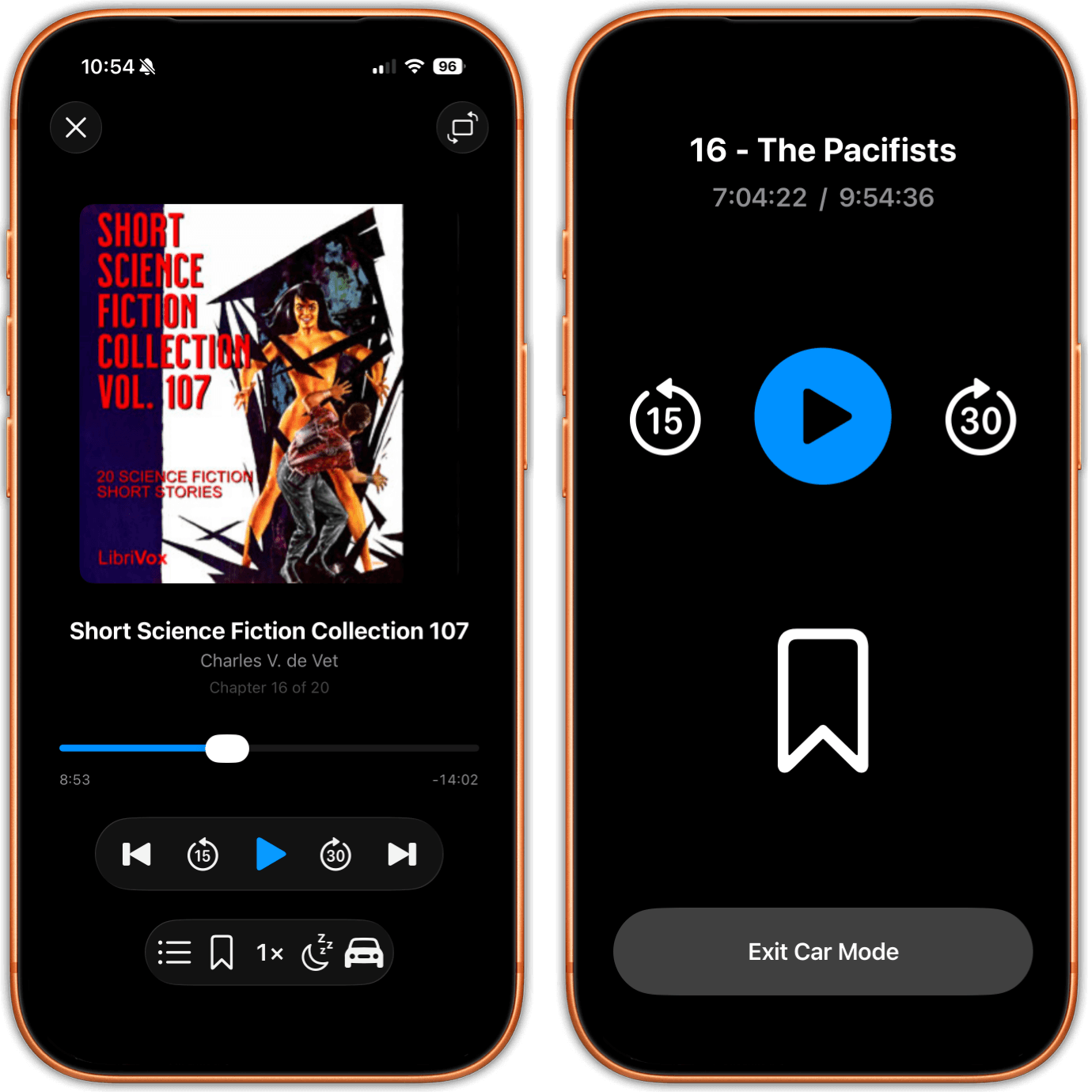
The justRead audiobook player showing cover art, the current chapter, playback speed and a sleep timer, beside Car Mode with oversized skip and play buttons

Why your own audiobooks are so awkward on an iPhone

Apple Books on the iPhone gives you no way to import an M4B file on the device itself. You can open the file in Files, where it plays as loose audio, but nothing files it in a library, remembers your place or shows you chapters. iCloud syncs the audiobooks bought from Apple rather than the ones you imported yourself, so a book you added on a Mac does not simply appear on the phone. And a folder of MP3 chapters is not treated as a book at all, because MP3 has no place inside the file to declare itself an audiobook, so the tracks are filed as music, one item per chapter.

justRead takes the computer out of that story. Point it at a folder the Files app can see and the audiobooks in it are imported on the device: a single m4b becomes one book, and a folder of chapter files becomes one book too, with one cover, one position and one chapter list. Title, author and cover art are read out of the files themselves.

It is not a store and it is not an Audible client. It plays the DRM free files you already have, in the same library as the EPUBs, PDFs and comics you already read, and the time you spend listening counts toward the same reading streak.

From a Folder of Files to Playing, in Three Steps

01

Put the files where Files can see them

Keep your audiobooks in any folder the Files app can reach: on the device, in iCloud Drive, or in a folder that Dropbox, Google Drive or OneDrive syncs into Files. Nothing has to be plugged in and nothing has to be converted first.

02

Import them on the phone

Point justRead at the folder. A single m4b, mp3, m4a, aac or flac file becomes one audiobook. A folder of chapter tracks becomes one audiobook as well, chapters in order. Title, author and cover art come out of the files, and every book in every subfolder is picked up, however deep it sits.

03

Press play

The chapter list shows where you are. Speed runs from 0.75x to 2x, one tap skips forward thirty seconds or back fifteen, and the sleep timer stops the book when you drift off. Lock Screen and Control Center controls keep working while the screen is off.

The justRead audiobook player with cover art, chapter position, speed and sleep timer, beside Car Mode with oversized skip, play and bookmark buttons

The Player, and Car Mode for the Drive

The player shows the cover, the author and the chapter you are in, with a chapter list you can jump around in. Speed runs from 0.75x to 2x, for the narrator who reads too slowly and the one who races. A single tap skips thirty seconds forward or fifteen back, which is the granularity you actually need when a sentence goes past while you are parking. Bookmarks are kept per audiobook, so a passage you want to find again is one tap away, and the sleep timer stops playback on its own.

Car Mode makes every control oversized, big enough to hit without looking, and you can drop a bookmark from it while you drive. With the screen off, the Lock Screen and Control Center keep the transport controls, so the phone can stay in your pocket. To be exact about it: there is no CarPlay. Car Mode runs on the phone's own screen, not on the car's built in display.

M4B on an iPhone: what the format actually is

An M4B is an MPEG-4 container, the same family as an M4A or an MP4, holding the same AAC audio. What makes it an audiobook rather than a song is metadata written inside the file: the container declares an audiobook media type, and the chapter marks live in the file as a chapter track. That is why an M4B can show a real chapter list, and why a plain MP3 usually cannot.

justRead reads that chapter information out of the file and shows it as a list you can jump around in, with your current position marked. Title, author and cover art are taken from the same file in the same pass, so a properly tagged M4B lands in the library complete, with nothing to type in afterwards.

Nothing needs converting first. Put the m4b in a folder the Files app can see and import it. If your collection is a mix of single m4b files and folders of MP3 chapters, both shapes work, and each one ends up as a single book rather than a pile of tracks.

M4B is in the title of this page because it is what people search for, but the player is not limited to it. mp3, m4a, aac and flac all play, and so do .audiobook and .zab packages. A .zab is simply a ZIP archive holding the audio files of a book, a format almost nothing on the iPhone bothers to open, and justRead plays both package types like any other audiobook.

Why M4B chapters go missing, and how to check your file

This is the most common audiobook complaint on the iPhone, and it is almost never the player's fault. There are three usual causes and they are easy to tell apart once you know what to look for.

The first is that the file is not really an M4B. Renaming an .m4a to .m4b changes the name and nothing else, and the bytes that declare the media type and hold the chapter track are not written by renaming a file. The audio then plays perfectly while the chapter list stays empty, because there was never a chapter track to read. You will find claims online that the two formats are identical apart from the extension. They are the same container family, which is why the audio plays, but a renamed file with no chapter data has no chapters to show in any player, on any device.

The second is that the chapters were written in a form the player is not reading. Chapter marks in an MPEG-4 file can be stored as a QuickTime chapter track or as Nero style chapter atoms, and encoders write one, the other, or both. A file that shows a chapter list in one app and one long track in another is usually this. So is the case people report where the same book, after the same sync, shows chapters on one device and none on the next.

The third is that it is an MP3, or a folder of them. MP3 has no container slot that declares a file to be a book, and although ID3 chapter frames do exist, most players ignore them. That is why a folder of chapter files is the more reliable shape for an MP3 audiobook, and why justRead builds the chapter list from the files in the folder rather than from tags nobody honours. If you want to check a file before blaming any app, open it in a tool that can show its container brand and its chapter list. A file named .m4b whose container brand reads as an audio file is the renamed case, and rebuilding it is the only real fix.

How a folder of MP3s becomes one audiobook

A twenty eight track MP3 audiobook is not twenty eight books, and it should not arrive in your library as twenty eight items. In justRead a folder of chapter files is imported as a single audiobook: one cover, one position, one entry in the library, and a chapter list built from the tracks it contains.

Two practical notes make this go smoothly. Keep each book's tracks together in their own folder, one folder per book. And if the track numbers are part of the file names, keep them zero padded, so that 02 sorts before 10; badly numbered tracks are the usual reason an audiobook plays out of order, in any app on any platform.

Nesting is fine. Point the app at a folder of audiobook folders, sorted by author or by series if that is how you keep them, and every book inside is imported however deep it sits. Pull to refresh rescans and picks up whatever you added since. Delete a book inside the app and a later rescan will not drag it back in.

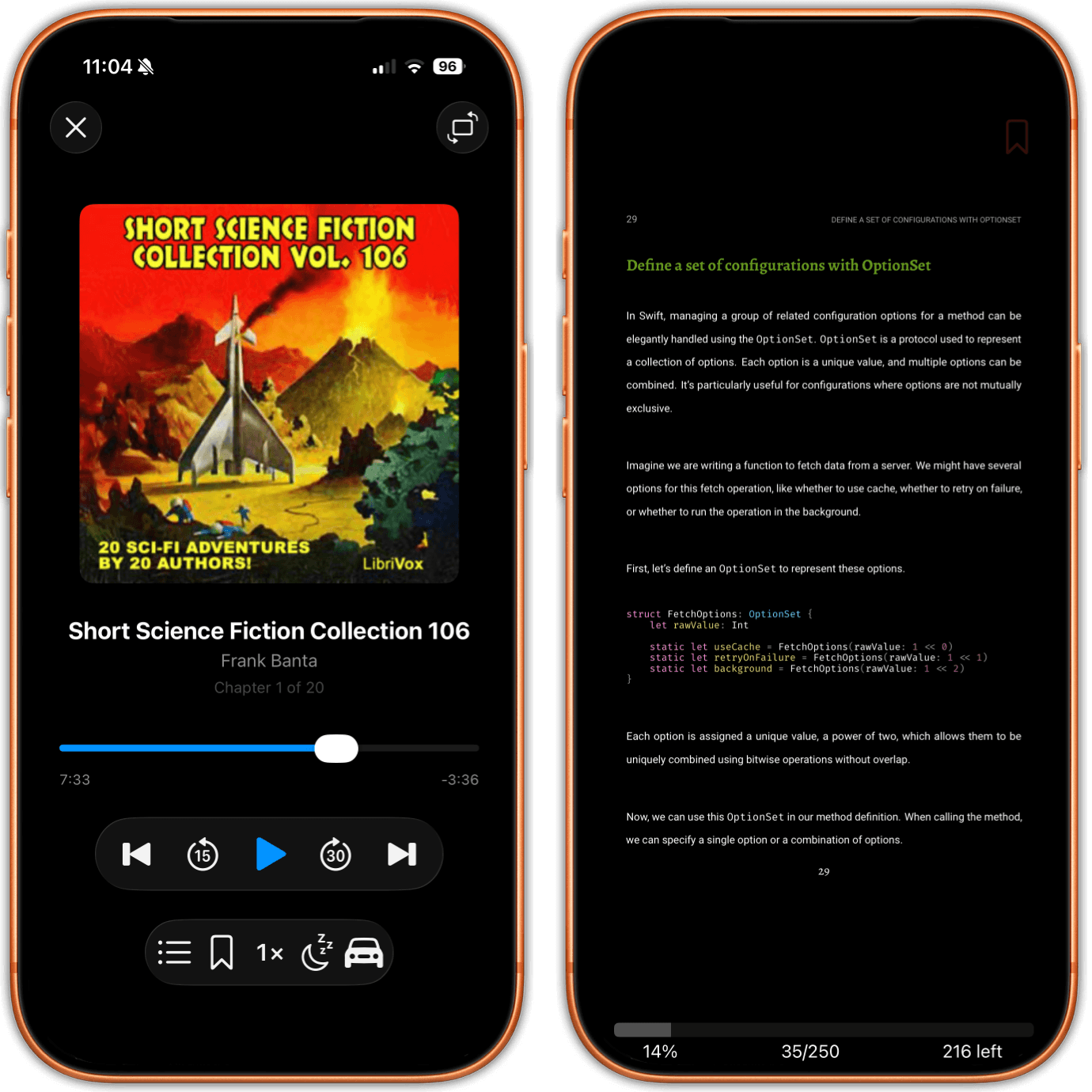
An audiobook playing on one iPhone and a PDF page open on another, both inside justRead

One Library for Listening and Reading

The audiobook you had on during a walk and the PDF you are working through sit in the same library, in the same app, with the same reading history behind them. There is no separate audiobook tab to remember and no second app to pay for.

That is more useful than it sounds. When you own a book in two forms, the audiobook and the ebook are two entries you can choose between depending on whether your hands are free, and both of them feed the same statistics rather than two sets of numbers that never meet.

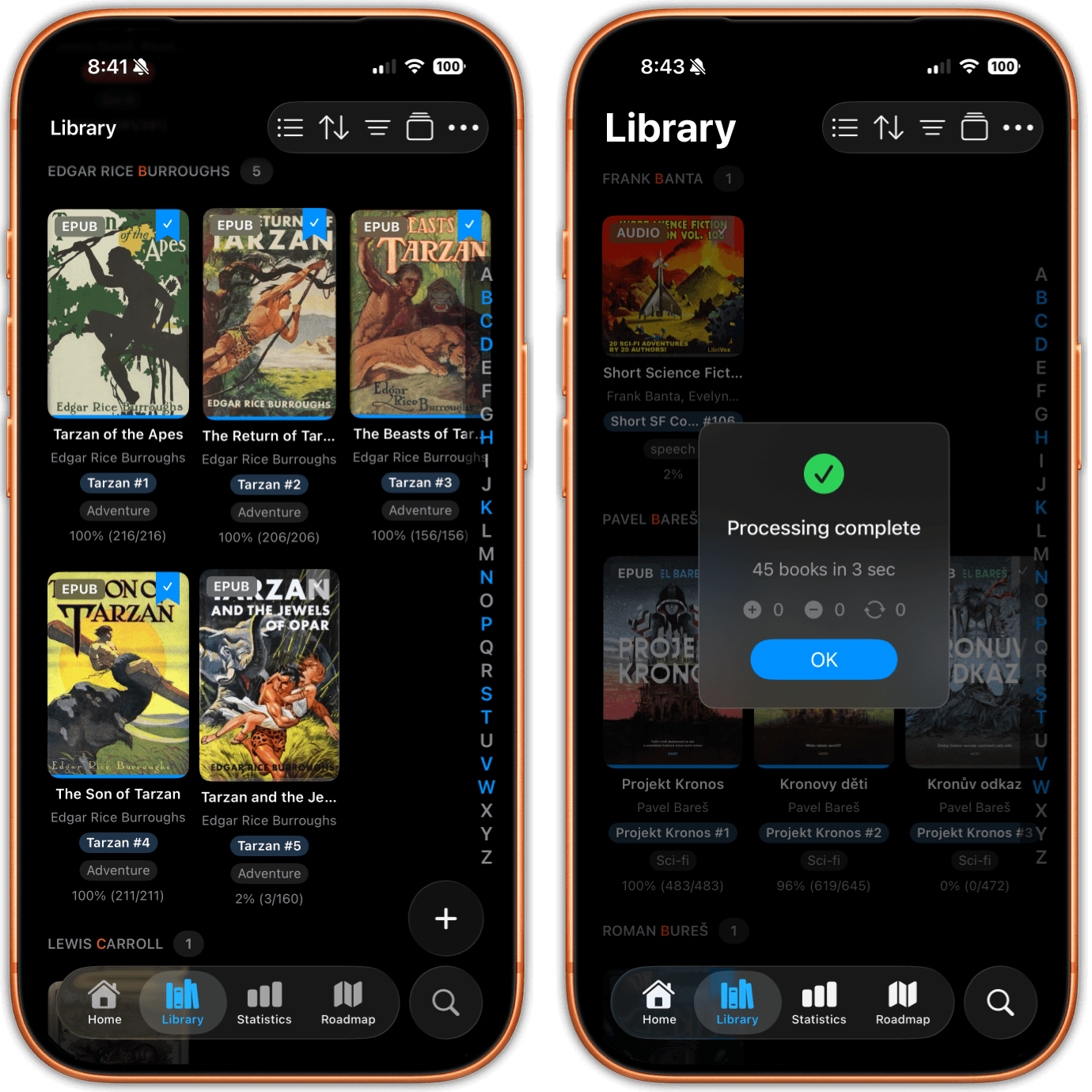
The justRead library showing covers with EPUB format badges and one cover carrying an AUDIO badge

An Audiobook Badge, and a Filter That Excludes Them

Every cover carries a format badge, so an audiobook is recognisable at a glance beside your EPUBs. Filter by format when you want only audiobooks, and tap the same chip twice to exclude them instead. The app's own example of that exclude gesture is everything except audiobooks, which is exactly what you want when you are choosing something to read rather than listen to.

Title, author and cover art come out of the audio files at import, so a well tagged collection arrives looking right. Audiobooks then sort, group and search alongside everything else, and a filter combination you use often can be saved and reused by name.

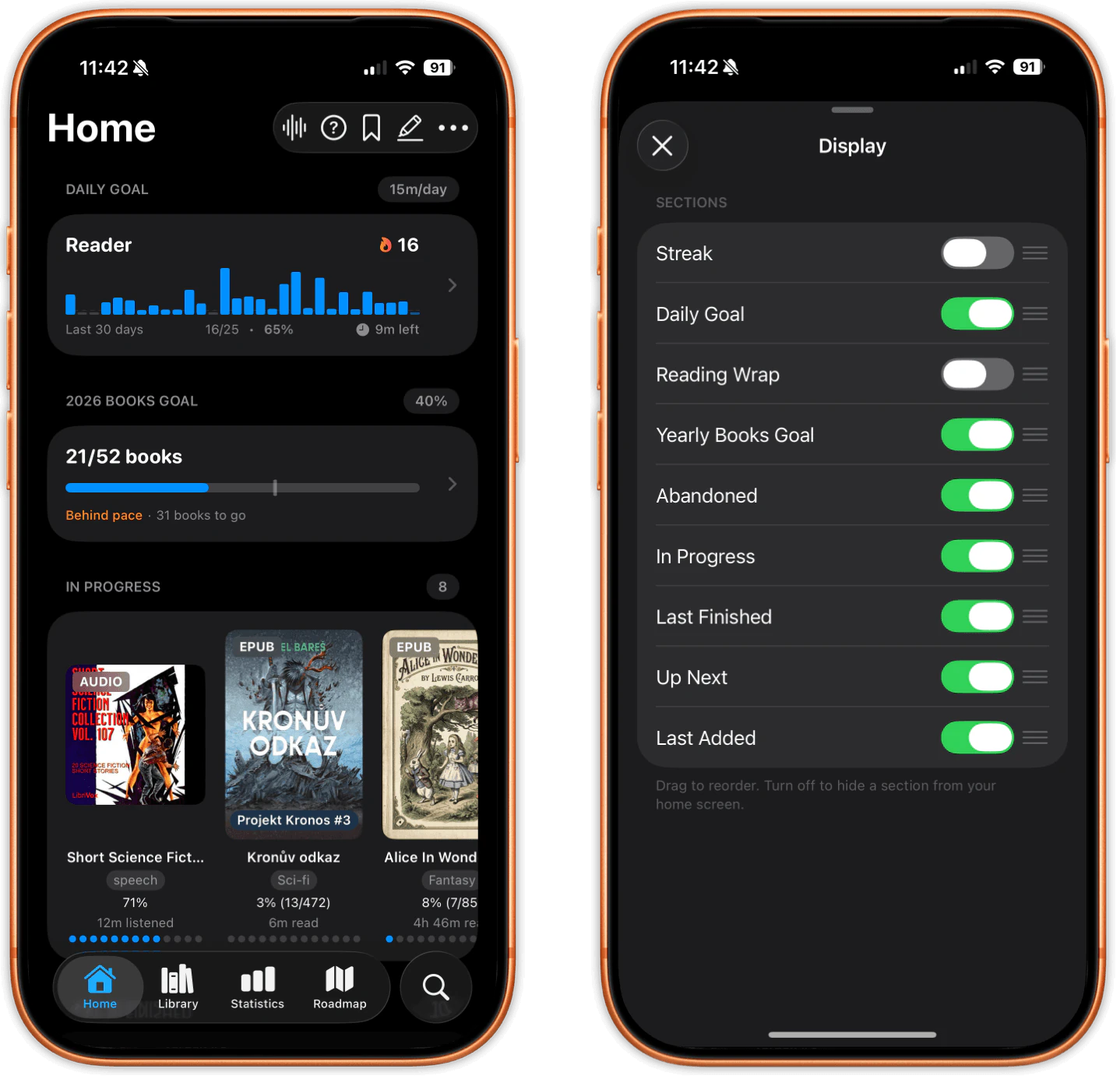
The justRead Home screen with an audiobook card showing minutes listened beside EPUB cards showing minutes read, above a daily goal and a streak

Listening Counts Toward Your Streak

Minutes listened appear on the Home shelf next to minutes read. Listening feeds the same daily goal, the same streak and the same statistics as an EPUB, a PDF or a comic, because it is one app keeping one count.

That is hard to get anywhere else, for a structural reason rather than a clever one: a dedicated audiobook app never sees the books you read with your eyes, and a dedicated reading tracker never hears the ones you listen to. If half of your reading is listening, the numbers finally say so.

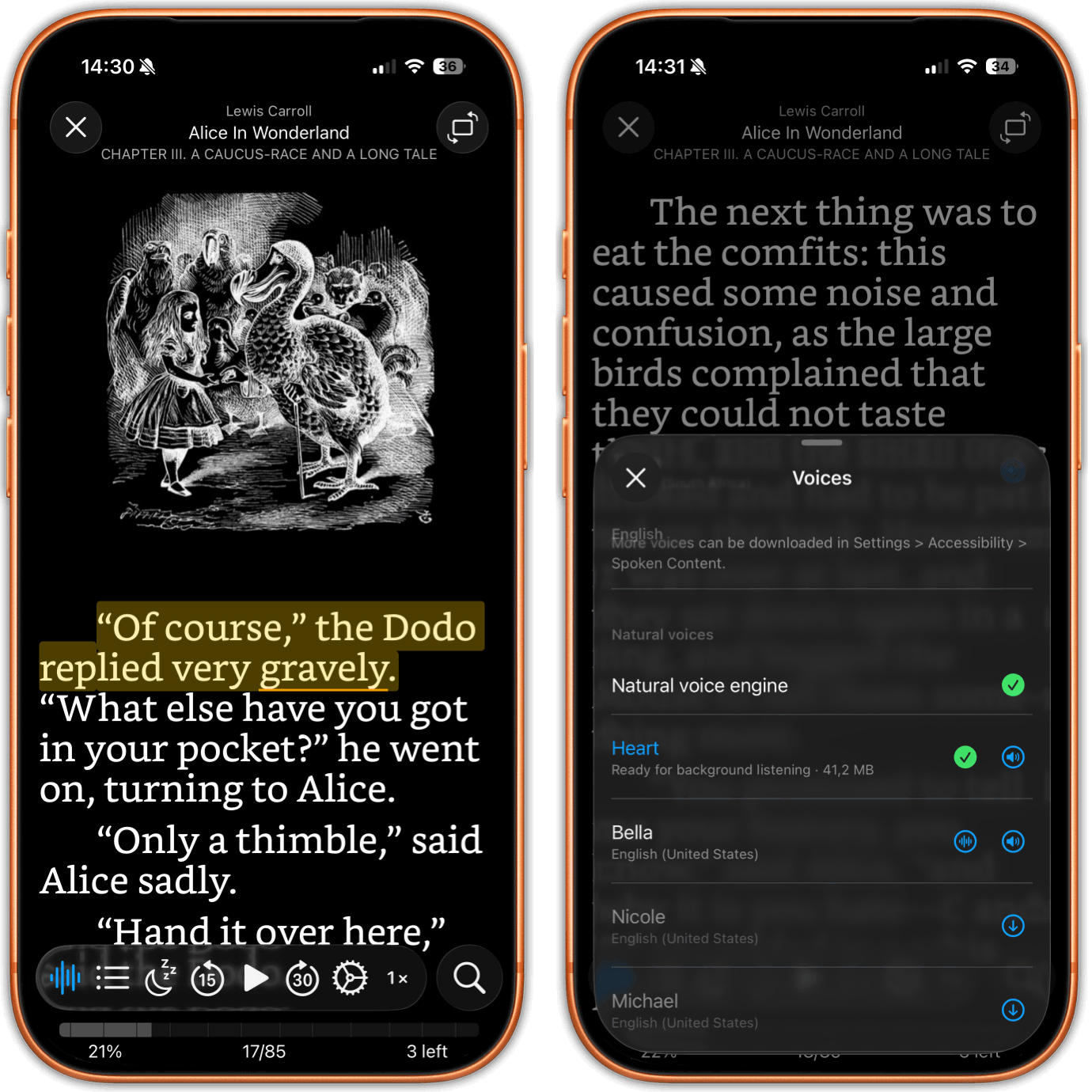
An EPUB being read aloud with the spoken sentence highlighted, beside the voice picker offering natural voices to download

Read Aloud Is a Different Feature, Not This One

Two things get confused with the audiobook player constantly, so here is the difference in plain terms. Read Aloud is speech synthesis. It speaks an EPUB out loud in an Apple voice or in a natural voice you download to the device, highlighting the sentence as it goes and turning the page on the word being spoken. It works on EPUBs, never on a PDF and never on a comic.

EPUB 3 read along narration is the third thing. That is audio a publisher recorded and shipped inside the book itself, played back with the text highlighting in time with the voice, and it only exists for the small number of books that carry it. Neither one is the audiobook player, which plays the m4b, mp3 and other audiobook files you already own and does not care whether an ebook edition exists at all.

justRead vs. Apple Books, for audiobooks you already own

The gaps people actually run into when the file did not come from a store

What you are trying to do justRead Apple Books on iPhone
Import an M4B on the phone itself Straight from the Files app No import step on the device
A folder of MP3 chapters One book, one chapter list Separate tracks, filed as music
Getting the files onto the device Any folder the Files app can see, iCloud Drive included Sync from a computer, repeated for every addition
Where the book may come from Any DRM free audiobook file you own The Apple Books store, or a computer import
Audio formats m4b, mp3, m4a, aac, flac, .audiobook, .zab M4B, with MP3s routed to Music
What else opens in the same app EPUB, PDF, and CBZ and CBR comics EPUB and PDF

Why Listeners Pick justRead for Their Own Files

Three differences that are structural, not adjectives

Nothing to buy inside it

Most audiobook apps are shopfronts. The player is the part they give away so that you buy the books from them.

justRead sells no audiobooks and carries no catalogue. It plays the DRM free files you already own, wherever you got them.

One app for listening and reading

Audiobooks in one app, ebooks in another, and two sets of reading numbers that never meet.

Audiobooks, EPUBs, PDFs and comics share one library, one set of filters and one reading history, so listening counts toward the same streak.

No computer in the loop

The standard advice for loading audiobooks onto an iPhone still begins with plugging it into a Mac and repeating that every time.

Import on the device from the Files app, including folders that Dropbox, Google Drive or OneDrive sync in. No cable, no conversion.

What this player does not do

There is no CarPlay. What exists is Car Mode, a screen inside the app with oversized controls you can hit without looking, plus Lock Screen and Control Center controls while a book plays. Those are genuinely useful and they are not the same thing as an app on your car's built in display. If CarPlay is the reason you are shopping, buy something else, and please do it before the trial rather than after.

There is no Audible support. AA and AAX files are DRM protected and stay inside Audible, and there is no way to import an Audible library. There is no streaming from a server either, so an Audiobookshelf or Plex collection needs a client built for that server. There is no store, no catalogue and nothing to purchase inside the app, and audiobooks are the one thing an OPDS catalogue will not hand you here.

On an audiobook there are no highlights or notes, and no metadata editing after import, so the title, author and cover art you get are the ones inside the files. And this is an iPhone and iPad app: there is no Mac, Android, Windows or web version.

ที่นักสะสมหนังสือชื่นชอบ

ดูสิ่งที่นักอ่านพูดถึงบน App Store

★ 4.6 / 5 · 24 คะแนนบน App Store

คำถามที่พบบ่อย

The questions people actually ask before they load their own audiobooks onto an iPhone

No. Audible's AA and AAX files are DRM protected, and that protection is the point of the format: only Audible's own apps can decrypt it. justRead plays DRM free files, so anything bought from Audible stays in Audible, and the same is true of anything you borrowed or streamed rather than downloaded as an unprotected file. If you own DRM free m4b or mp3 files, those play here.

Yes. That is one of the two shapes the player handles: a single file audiobook, or a folder of chapter files that becomes one audiobook with one cover, one position and one chapter list. You do not have to convert a folder of MP3s into an M4B first. Keep each book's tracks in their own folder and keep any track numbers in the file names zero padded, so that 02 sorts before 10.

Three usual causes. The file may be an .m4a that was renamed to .m4b, which changes the name and not the bytes that hold the chapter track, so there are no chapters to read. The chapters may be written as Nero style atoms or as a QuickTime chapter track, and the app that wrote them and the app playing them may disagree about which to read; a book that shows chapters on one device and not on another after the same sync is almost always this. Or the file is an MP3, which has no container slot for chapters that players reliably honour. A folder of MP3 chapters avoids the problem entirely.

Yes. Listening feeds the same daily goal, the same streak and the same statistics as reading an EPUB, a PDF or a comic, and the Home screen shows minutes listened next to minutes read. It is one app keeping one count, which is why an audiobook on a long walk keeps a streak alive.

No. There is Car Mode, a screen inside the app with oversized controls sized for use while driving, including setting a bookmark, and there are Lock Screen and Control Center controls whenever a book is playing. Car Mode runs on the phone's own screen rather than on your car's built in display, so if CarPlay is a requirement, this is not the app for it.

Put the files in any folder the Files app can see and import them in the app. That includes folders on the device, iCloud Drive, and folders that Dropbox, Google Drive or OneDrive sync into Files. You can also open an audiobook in justRead from a share sheet. Nothing has to be plugged in, and nothing has to be converted on a desktop first.

m4b, mp3, m4a, aac and flac, plus .audiobook and .zab packages. A single file becomes one audiobook, and so does a folder of chapter files. Title, author and cover art are read out of the files themselves, so a well tagged collection needs no cleanup afterwards.

Free 14-day trial with full access, no account required. Then $4.99/month or $29.99/year. The audiobook player is part of the app rather than an add-on, and one purchase covers iPhone and iPad.

Start Listening to the Books You Own วันนี้

Download justRead, point it at the folder your audiobooks already live in, and press play. Free 14-day trial, no account needed.

ทดลองใช้ฟรี 14 วัน ไม่ต้องสร้างบัญชี