Success
This is the second article in a series about how justRead was built. And more importantly, why it was built the way it is.
The first part explored the problem: what's missing from reading apps today, and why I decided to build something different.
This second part is for you, the reader. Not for developers or designers. This is about understanding the thinking behind every feature you'll experience when you open justRead. It's about the philosophy that shaped every design choice; the reasons why things work the way they do.
If you read previous part and thought "that sounds interesting", this article explains exactly what makes justRead different in practice. It's the how and the why, told from your perspective.
The design decisions behind every feature
When you open an app, you don't think about why a button looks the way it does, or why your books are sorted a certain way. You just want it to work. You want it to feel natural. You want to forget you're using an app at all. You want to be reading, not thinking about using the software.
That's the entire point of justRead.
But behind every single feature - the way the app feels, the way it's organized, the way it lets you read - there are deliberate design choices. Not random decisions. Choices made specifically with you, the reader, in mind.
Here's why each of these choices matters.
Why native iOS instead of something "Universal"
When I started building justRead, I had a choice: build an app that works on iOS, Android, web, and desktop, or build something that feels truly native to your iPhone.
I chose native iOS.
Here's why: Speed.
Not just speed in the technical sense, though that matters too. I mean the speed you feel. The responsiveness. That instant gratification when you tap something and it reacts immediately, like the phone is reading your mind.
You use your iPhone for reading in moments stolen between other things. You pick it up, you want to open a book, and you want to start reading now. Not wait for something to load. Not tap something and wonder if it actually worked. You want the phone to feel like an extension of your hand, not a tool you're operating.
When you build an app that works everywhere - iOS, Android, web - something gets lost. The app has to work at the lowest common denominator. It has to compromise to fit all platforms. It can't take advantage of what makes your iPhone special. It can't use the hardware the way it was meant to be used.
justRead is built using SwiftUI, Apple's native framework. This means every animation, every gesture, every interaction uses the full power of your iPhone. The app simply knows your device. It can respond faster. It can feel smoother. It can do things a "universal" app simply can't.
Building for iPhone specifically means justRead is designed for your device, not designed to check a box that says 'works on 5 platforms.'
Why justRead looks and feels like Apple itself
If you use Apple products, you know something: they feel familiar. You pick up an iPad after using an iPhone for years, and somehow you just know how things work. The buttons look the same. The gestures feel the same. The way things move feels the same.
That consistency is intentional. It's powerful. And justRead was designed to follow it.
justRead doesn't have its own design language. It doesn't have custom buttons or strange gestures you need to learn. Instead, it borrows Apple's design language: the same one you already know from Messages, Notes, Mail, and Safari.
Why? Because the moment you open justRead, it should feel like home. You shouldn't have to think about how to use it. The design should be invisible. Your focus should be entirely on your book, not on figuring out the app.
When a reading app uses Apple's design patterns, you benefit in ways you might not even notice:
- The menus and buttons look and feel like every other Apple app. justRead uses the exact same design elements as Messages, Mail, Safari, and Notes. You'll recognize everything instantly because it matches what you see everywhere else on your iPhone.
- Gestures work the way you know. Swipe back to go back. Swipe down to refresh. Tap to select. Nothing surprising.
- Everything adapts to your preferences. Light mode, dark mode, dynamic type for text size: justRead respects your settings because it's built on the same foundation as Apple's own apps.
- Accessibility is built in. Screen readers, voice control, motion reduction: all of it works without extra work because justRead uses Apple's native tools.
You can think of it this way: Apple's design language is a language you already speak fluently. justRead is written in that same language. No translation needed. No learning curve. Just reading.
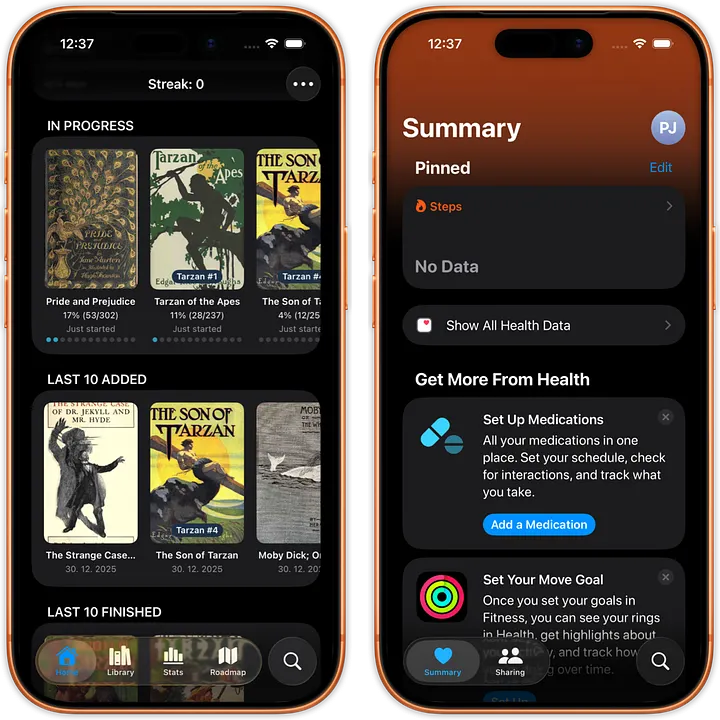
justRead uses the same design language as Apple
Why your books stay in your hands
Most reading apps want to import your library. They want to copy your EPUB files into their app, into their own database, their own ecosystem. Once you do that, your books are trapped. They exist only inside that app. Move to another reading app? Your library stays behind.
justRead does the opposite.
Instead of copying, you simply tell justRead where your books are. You point it to a folder on your iPhone through the app. That's it. You can keep your books in a folder on your device, and justRead reads from there.
But here's where it gets powerful: if you want your books to also appear on your Mac or PC or different device, you can put that folder in a cloud service like iCloud Drive, Dropbox, Google Drive and others. The same folder syncs everywhere automatically. But you don't have to, it's completely optional. You can use justRead with just a local folder on your iPhone, with no cloud involved at all.
That means you remain in control. Your books stay your books. You own them. You can open them in other apps whenever you want. You can edit the metadata in Calibre on your computer, and those changes automatically appear in justRead without re-importing anything.
Adding books is effortless. You want to add a new EPUB? Drop it into your folder. You don't need to open justRead, find an import button, wait for processing, and manage library conflicts. You just drop the file where it lives, and the next time you open justRead, refresh the library and it's there.
Removing books is just as simple. Delete a file from your folder, refresh and it's gone from justRead too. No leftover database entries. Just gone.
Updating is seamless. Change a book's metadata (in Calibre, for example), add tags, update the author name, change the cover, create a series, and justRead picks it up automatically the next time you refresh the library. Want to replace an old edition with a better version?
Your library can grow infinitely. You have 100 books? 1,000? 5,000? justRead handles it the same way your operating system handles files in a folder - without slowdown, without re-indexing, without any fuss. The app simply reads what's there.
Cloud sync is automatic and real. If you use iCloud Drive or Dropbox, your books sync across your devices without you doing anything. Start reading on your iPhone. Switch to your iPad. Your entire library is there, instantly, because it's not stored in justRead's database - it's stored in your cloud folder, where it belongs.
This is why the design decision to use folders instead of importing changed everything. It shifted power back to you. Your books library? Use it directly. Your iCloud folder? Point justRead there. Your system-wide file organization? It just works.
Most apps want to be the center of your digital universe. justRead wants to be a tool that fits into your universe, respecting how you already organize things.
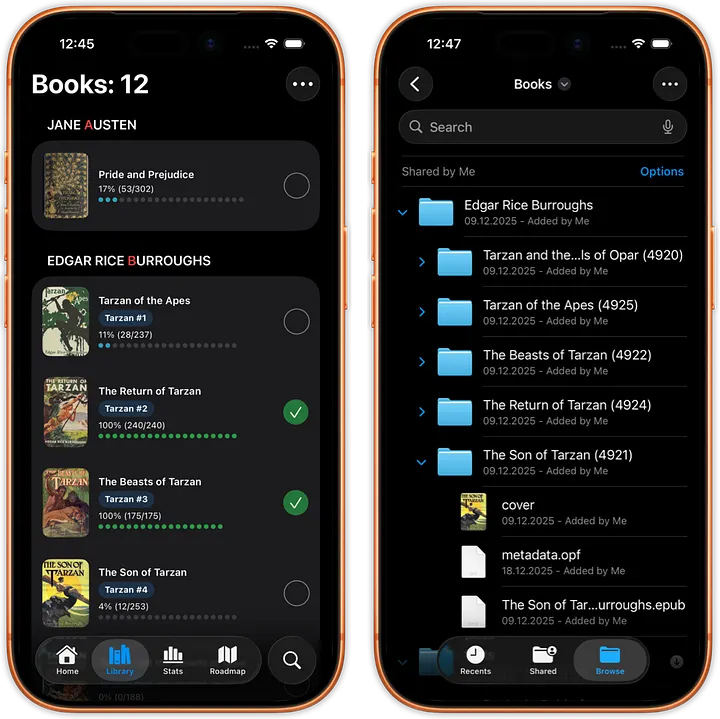
justRead mirrors all books from selected folder (stored in iCloud, in this case).
Why fonts work the same way
The same philosophy extends to fonts.
You have favorite fonts. Maybe you've collected them over years. Maybe you use specific fonts for dyslexia-friendly reading. Maybe you have a set of fonts that just feel right to you (like Bookerly to me).
Most reading apps give you a small set of fonts, usually a dozen choices baked into the app. If you want something different, you're stuck. You can't use your own fonts because they're not in the app's hardcoded list.
justRead lets you point to a folder with your fonts. Your folder. The fonts you've chosen. The fonts you consider beautiful and readable.
Here's how it works: you point justRead to the same folder where you keep your books. If you want to keep things organized, you can create a subfolder inside it called "fonts" and put all your fonts there, but that's completely optional. justRead will find them either way. You could also just keep fonts in the main folder mixed with everything else. It's up to you.
This creates the same benefits as books:
- You're not limited by what the developer included. You choose the fonts you want.
- Your preferences travel with you. Put the fonts folder in iCloud Drive, and they're available on any device running justRead.
- You can update fonts anytime. Add a new font to your folder, and justRead uses it immediately.
- You own your typographic choices. Not locked into what some app designer thought would be nice.
Reading is intimate. The way text looks while you read matters. It affects your experience, your comfort, sometimes even your ability to read. justRead doesn't decide that for you. You do.
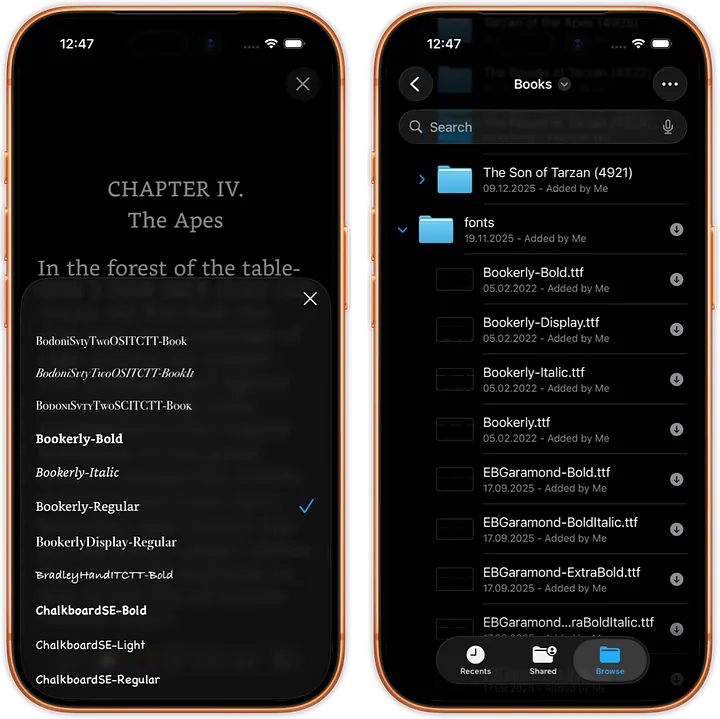
Every font saved in a folder (here named fonts) is automatically loaded to justRead for use.
Why your library is sorted by Author by default
Open the library in justRead, and your books are sorted by author, then by title or series, then by series index.
This might seem like a small detail, but it's not.
Open the library in justRead, and your books are sorted by author, then by title or series, then by series index.
This might seem like a small detail. It's not.
Think about how books are organized in a physical library. They're not sorted by color or by when you bought them. They're sorted by author. You walk to the "M" section to find China Mieville. You look for the series together, in order. That's how your mind naturally finds books too.
When you open your library and see books grouped by author, with series within each author nicely ordered, you're looking at your books the way you actually think about them. There's no cognitive friction. You don't have to search or scroll through random order. If you want to read more by an author you love, they're grouped together. If you want to continue a series, the books are in the right order.
This isn't about features. It's about understanding how readers actually use a library.
justRead respects that mental model.
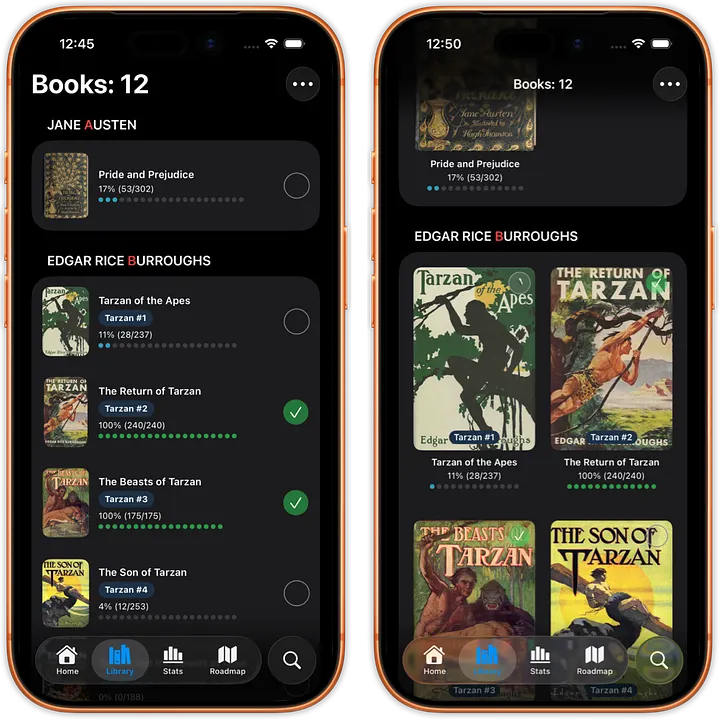
Sorting just like in a physical library. Every books displays progress, state and number of pages.
Why you control orientation, not your phone's accelerometer
Here's a small choice with surprisingly big implications: justRead doesn't auto-rotate.
Your iPhone has an accelerometer. It detects which way you're holding it and automatically rotates the screen. Most apps use this. You tilt your phone and the content reorients.
But justRead doesn't. You lock it to portrait or landscape, and it stays there.
Why?
Reading requires concentration. The last thing you need while immersed in a book is your phone suddenly rotating because you shifted your arm slightly. Your phone rests at a natural angle for reading. You're in flow state. You don't want interruptions.
That auto-rotation? It's an interruption. You're reading on your side in bed, and suddenly the text rotates because your phone tilted. You're holding the phone one way, but your accelerometer decides it's time to rotate. Your immersion breaks.
justRead lets you decide. Do you want to read in portrait or landscape today? You choose once, and your phone respects your choice. The reading doesn't break.
Some people prefer landscape for the wider text area. Some prefer portrait for holding the phone with one hand. Some switch between them depending on position. justRead doesn't force you. Your phone doesn't decide. You decide.
In a reading app, that control is everything.

When you change the screen (left bottom icon) into landscape, it stays in landscape no matter the orientation.
Why invert images
There's a feature in justRead that seems small but shows the entire philosophy behind it: you can choose to have images automatically inverted.
Think about reading an illustrated book at night in dark mode. A black-and-white illustration on a white background is easy to read during the day. But at night, you want a dark background to reduce eye strain.
Most apps show you the original image - white background, black lines - even though you're reading on a dark background. The result: eye strain. The image is bright while everything else is dark. Your eyes have to adjust constantly.
justRead solves this by allowing you to invert images. The illustration now has a dark background and light lines, matching your reading environment. Your eyes don't strain. The book remains comfortable to read at night.
This is a tiny detail that most developers miss. But it's exactly the kind of thinking that separates an app built for readers from an app that just happens to display books.
Press enter or click to view image in full size
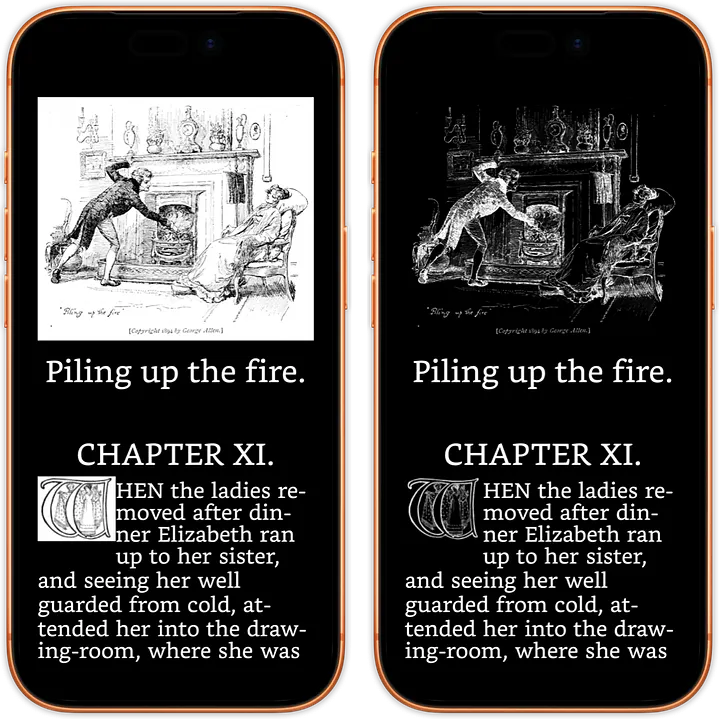
If you choose to, you can display images inverted.
Why everything about organization follows your Calibre library
If you're a serious reader with hundreds of books, you probably use Calibre: the open-source library management tool. You've spent time organizing your books, adding metadata, sorting by series and author.
justRead doesn't ask you to rebuild that organization inside a new app. Instead, it respects the organization you already did.
If you use Calibre to manage your books, and you point justRead to that library, everything you've organized appears exactly as you organized it. The series metadata. The author names. The cover art. All of it flows into justRead without any re-import or manual work.
This reveals something about justRead's philosophy: The app should adapt to you, not force you to adapt to the app.
You have a system that works for you. justRead's job isn't to replace it or rebuild it. It's to enhance it. To give you reading tools on top of the organization you've already built.
Press enter or click to view image in full size
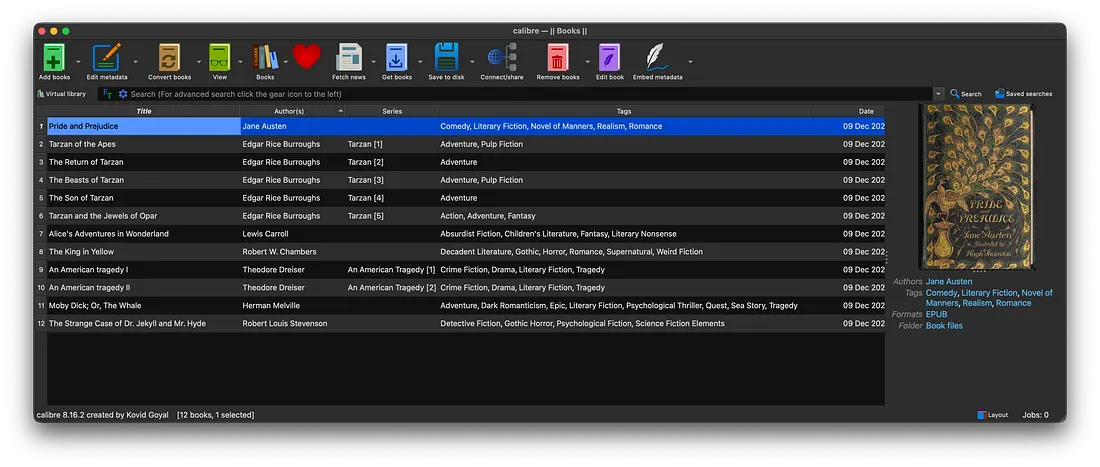
Calibre, in this case, used for managing books in selected folder.
What This All Means
Every design choice in justRead comes back to the same principle:
The app should get out of your way.
- It's built with native speed so you can start reading instantly.
- It looks and feels like Apple so you don't think about the interface.
- It manages books from folders you control, not locked databases.
- It uses fonts you choose, not defaults.
- It organizes books the way you already think about them.
- It respects your choice of orientation and reading position.
- It protects your eyes with inverting images if you want to.
- It works with the organization systems you already built.
These aren't features to brag about. They're not checkboxes on a marketing list. They're design decisions made because someone, who loves reading and understands apps, thought deeply about what readers actually need.
When you open justRead, you shouldn't think about any of this. You should think about your book. About the story. About the words on the page.
The app should disappear.
And that's exactly what justRead does.
justRead is coming to TestFlight this January, with public release in March. If these design principles resonate with you - if you want a reading app that works the way you actually want to read - join the waitlist at www.justread.app.
Peter
Reader, Developer, justRead Creator