This is the third article about justRead app for reading on iPhones.
This article focuses entirely on screenshots and visual comparison, because images reveal what text alone cannot. Let’s explore how these four apps stack up across the features that matter most to readers.
User interface
When you open a reading app, you shouldn’t need to learn new patterns. You should simply use it.
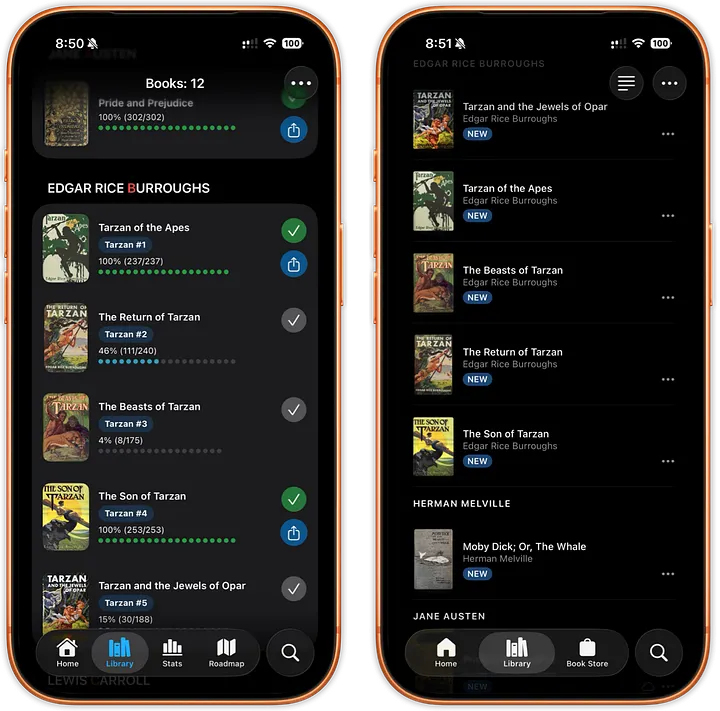
Left: justRead, Right: Apple Books
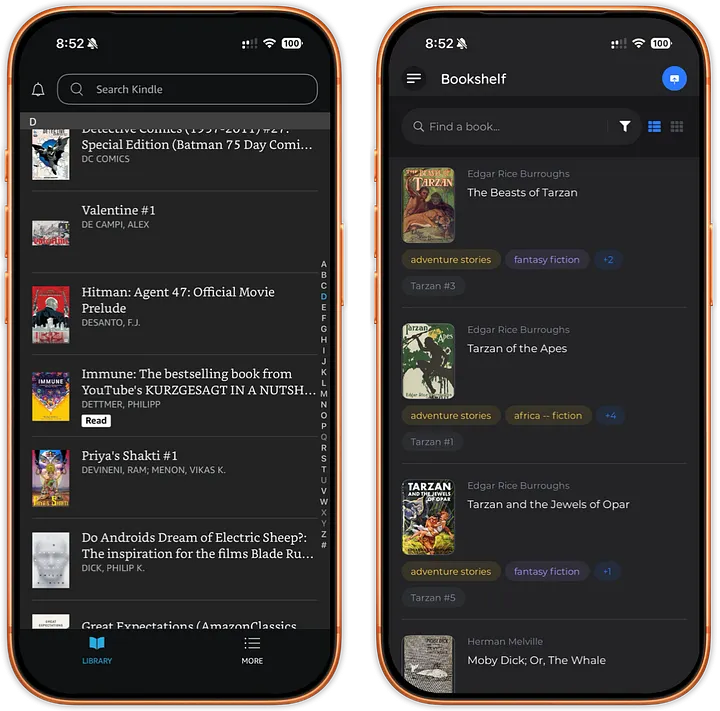
Left: Kindle, Right: Book Fusion
justRead respects Apple’s design rules with a modern, intuitive interface. Users can navigate without friction or confusion.
Apple Books follows Apple’s design standards consistently, delivering the familiar experience you’d expect from a first-party app.
Kindle employs its own UI with a bottom menu. While it breaks Apple’s conventions, the layout is at least predictable.
BookFusion takes a completely different approach, hiding everything in a top-left menu that feels more like a mobile web app than a native iOS experience.
Winner: justRead and Apple Books — Both reward users who expect standard iOS behavior.
Default library sorting
How your library is organized directly impacts how quickly you find what you’re looking for.
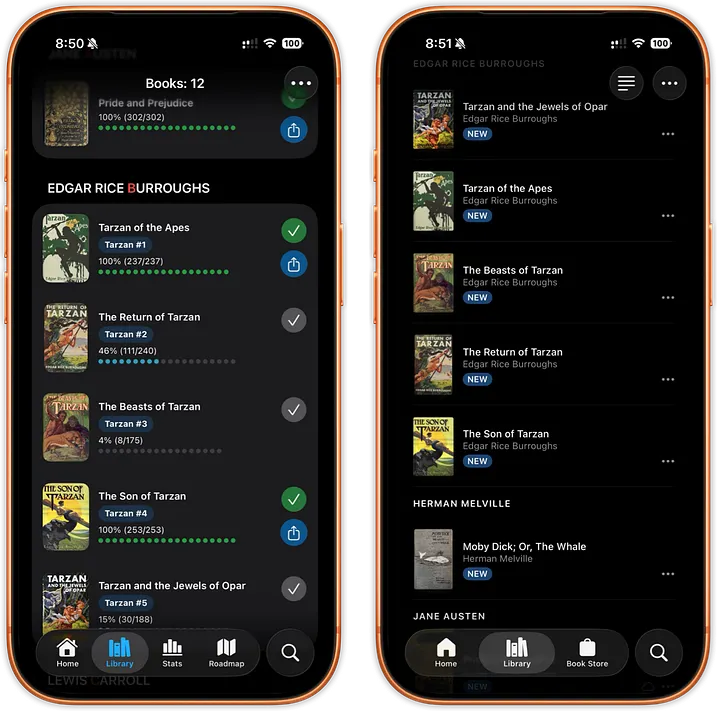
Left: justRead, Right: Apple Books
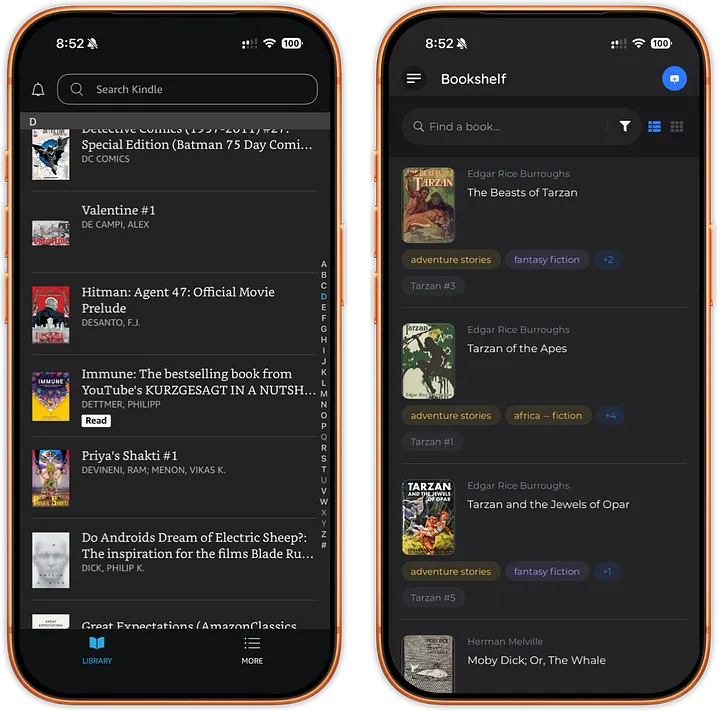
Left: Kindle, Right: Book Fusion
justRead sorts intuitively: first by author surname, then by book title, with series arranged in publication order rather than alphabetically. This mirrors how physical libraries organize books.
Apple Books sorts by author’s first name, then book title. Series aren’t recognized as a unit.
Kindle sorts by author surname, then book title. Series information is lost for imported books.
BookFusion sorts by author’s first name, then book title, with no series awareness for sorting.
Winner: justRead — It respects the natural order users expect, making book discovery effortless.
Font selection and customization
For many readers, font choice isn’t a luxury — it’s essential. Users with dyslexia, visual sensitivity, or personal preference deserve options.
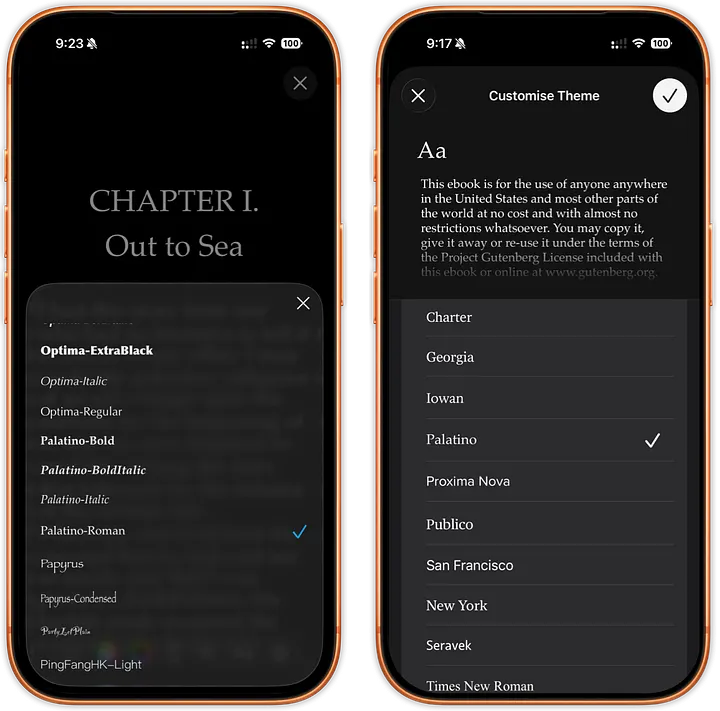
Left: justRead, Right: Apple Books
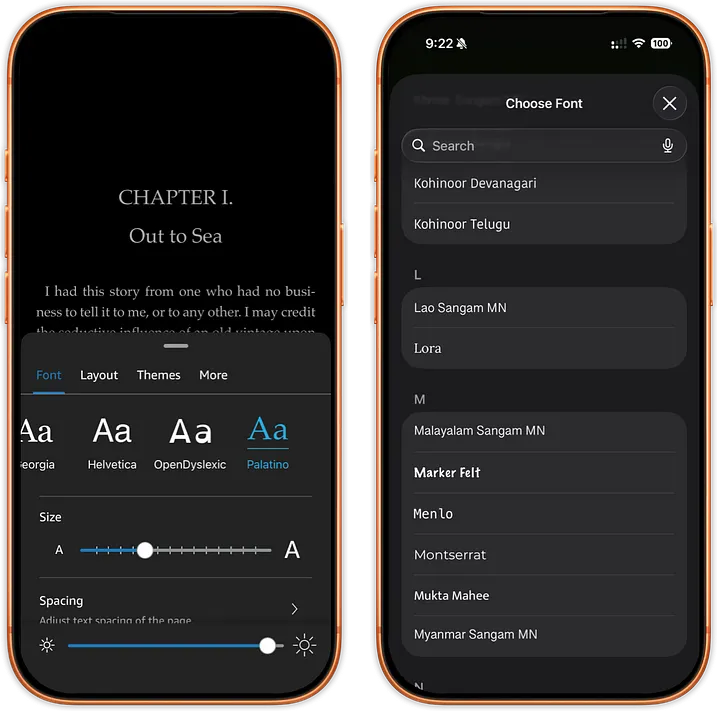
Left: Kindle, Right: Book Fusion
justRead gives you every system font from your iPhone, plus the ability to easily add custom fonts to your library. Real-time preview as you change fonts.
Apple Books offers 14 fonts with no customization options. Changes appear in preview text.
Kindle offers 8 fonts with no customization. Changes preview immediately.
BookFusion includes all system fonts but no custom font support. You must navigate through menus to see how fonts actually look in context.
Winner: justRead — Complete font freedom with instant visual feedback.
Color customization
Reading comfort is personal. One reader’s ideal setup might be another’s nightmare.
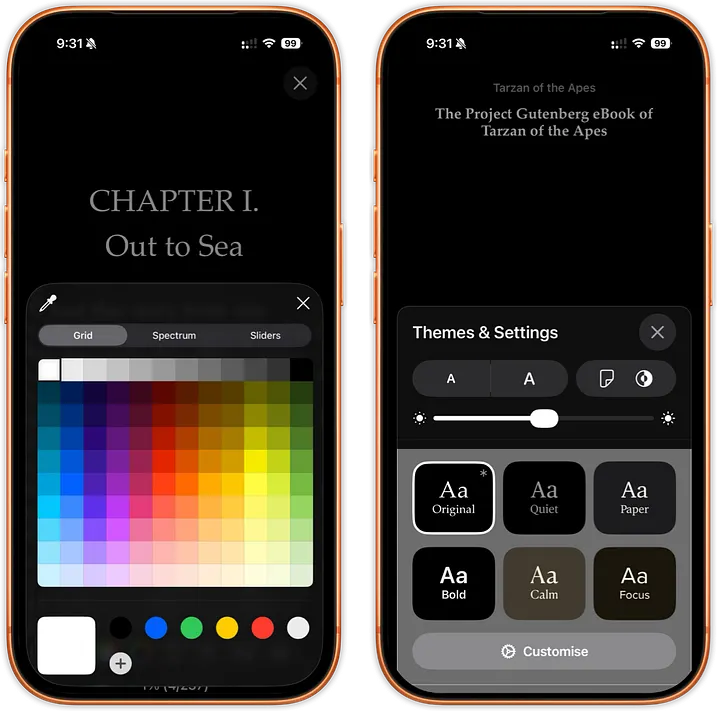
Left: justRead, Right: Apple Books
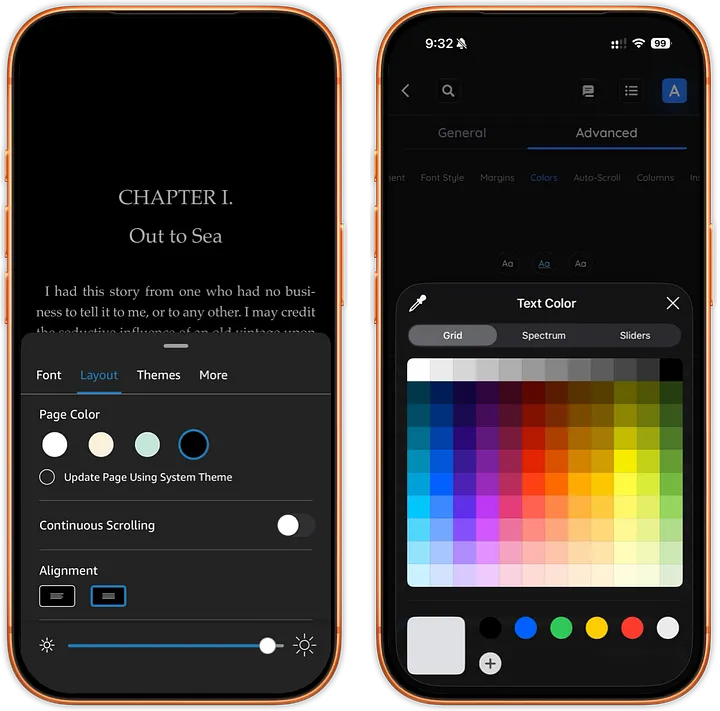
Left: Kindle, Right: Book Fusion
justRead lets you set any color combination for text and background, with immediate preview.
Apple Books provides 6 predefined color schemes, with immediate visual feedback.
Kindle provides 4 predefined color schemes, with immediate visual feedback.
BookFusion supports custom text and background colors, but changes are buried in menus. You won’t see how your book looks until you navigate back through multiple screens.
Winner: justRead — Full color control with instant feedback, respecting the diversity of readers’ visual needs.
Customization: depth & accessibility
The best reading app gets out of your way. How many menu levels do you need to navigate to adjust your experience?
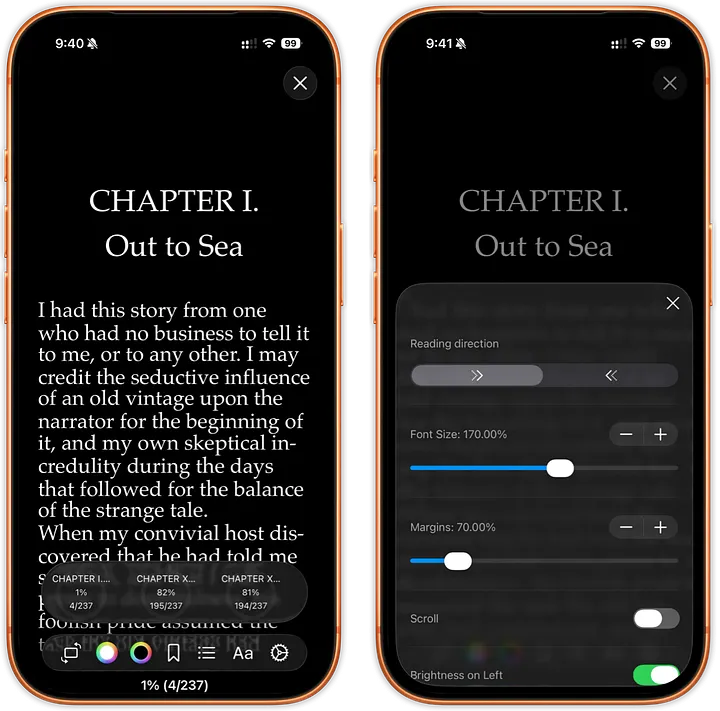
justRead: 2 levels of depth
justRead
- Maximum 2 levels of menus to change anything
- Accessible from the bottom menu bar
- Options include margins, spacing, reading direction, image inversion, indentation, and more
- Philosophy: simplicity by design
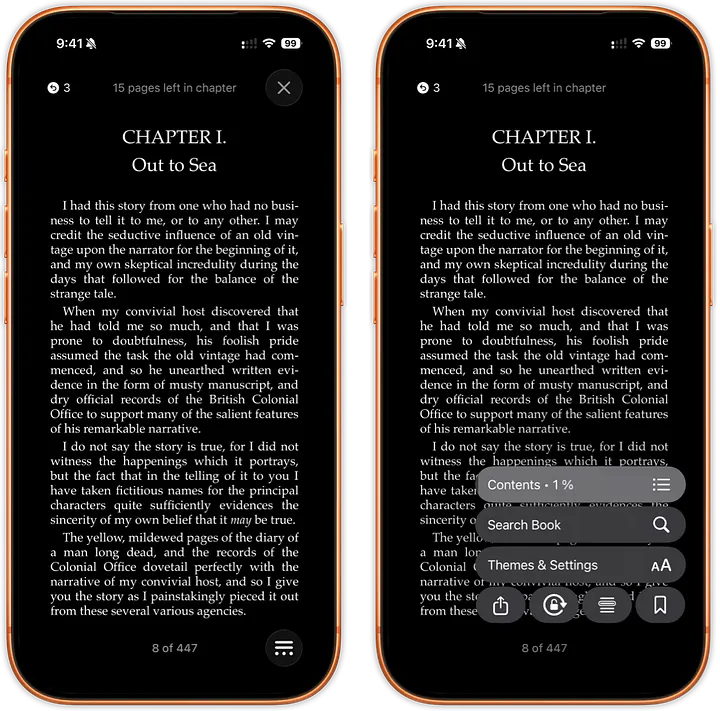
Apple Books: first two levels of depth
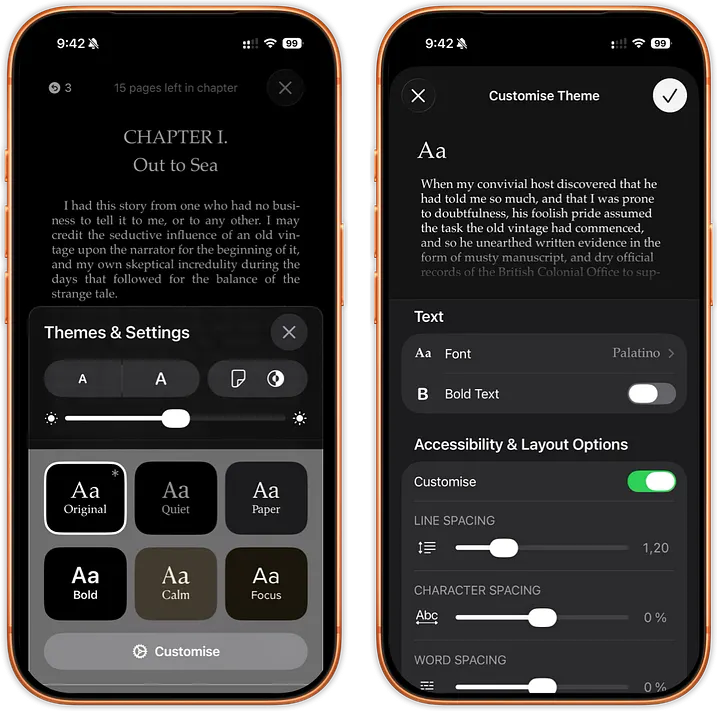
Apple Books: another two levels of depth
Apple Books
- 4 levels deep to customize
- Limited customization options overall
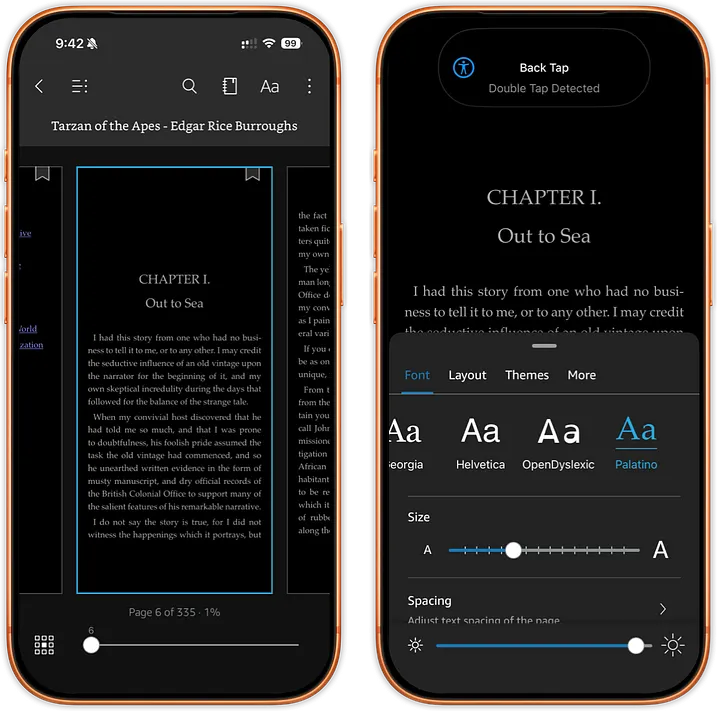
Kindle: first 2 levels of depth
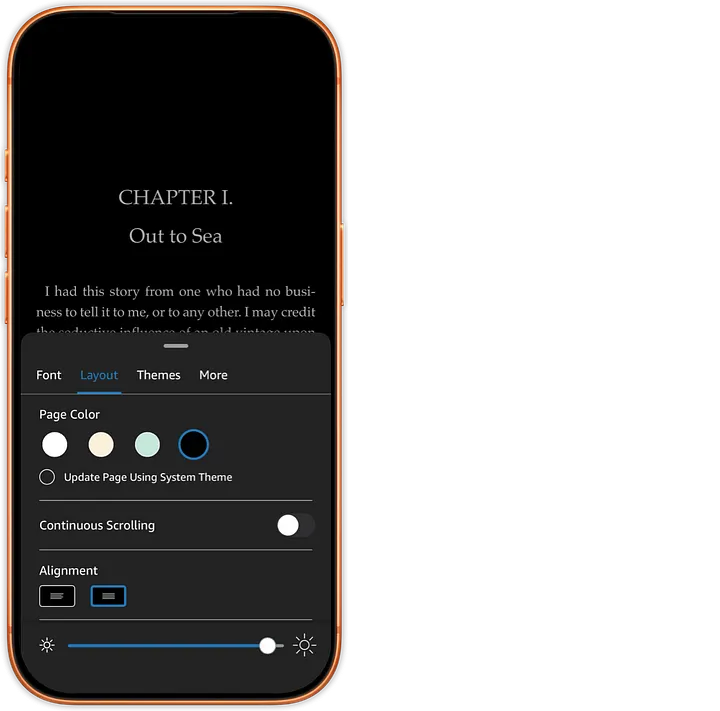
Kindle: third level of depth
Kindle
- 3–4 levels deep depending on the setting
- You may need to switch tabs to access different options
- Limited customization options
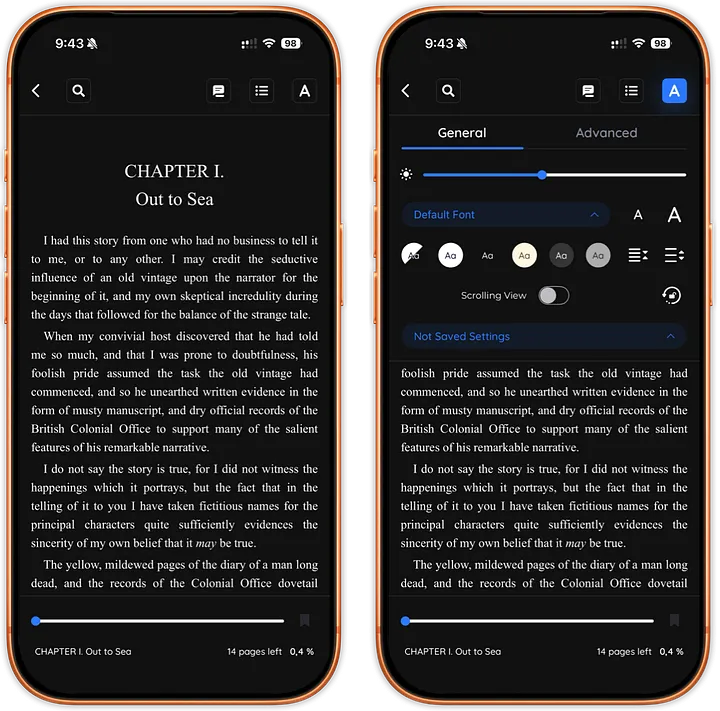
Book Fusion: first 2 levels of depth
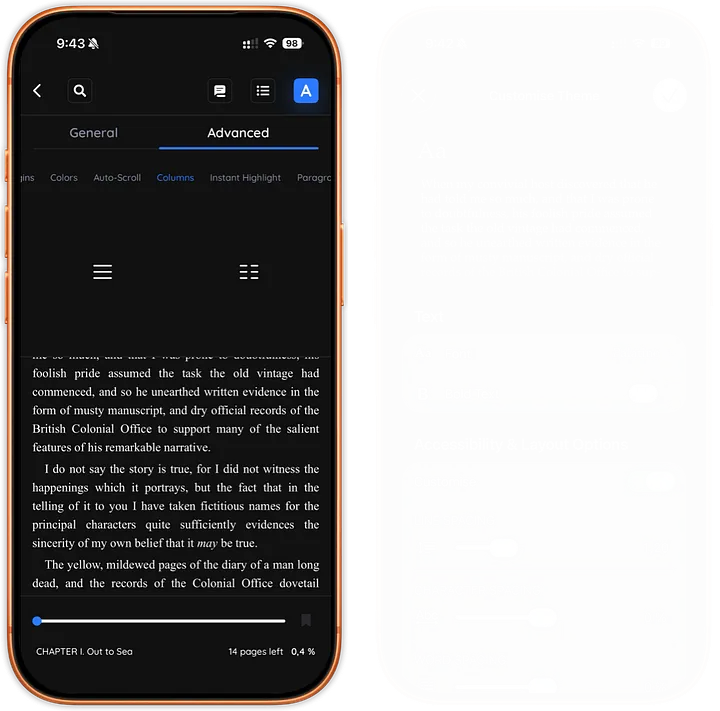
Book Fusion: third level of depth
BookFusion
- 3–4 levels deep depending on the setting
- Extensive options (rivaling justRead in scope)
- Critical problem: The menu structure is confusing and opaque. It’s unclear where to find what you want
- Winner: justRead — Full customization accessible with minimal friction. You can adjust anything in two taps.
Margins: Maximizing Screen Space
True margin control means reading more text with less hand movement — and better focus.

Top: justRead, Bottom: Apple Books
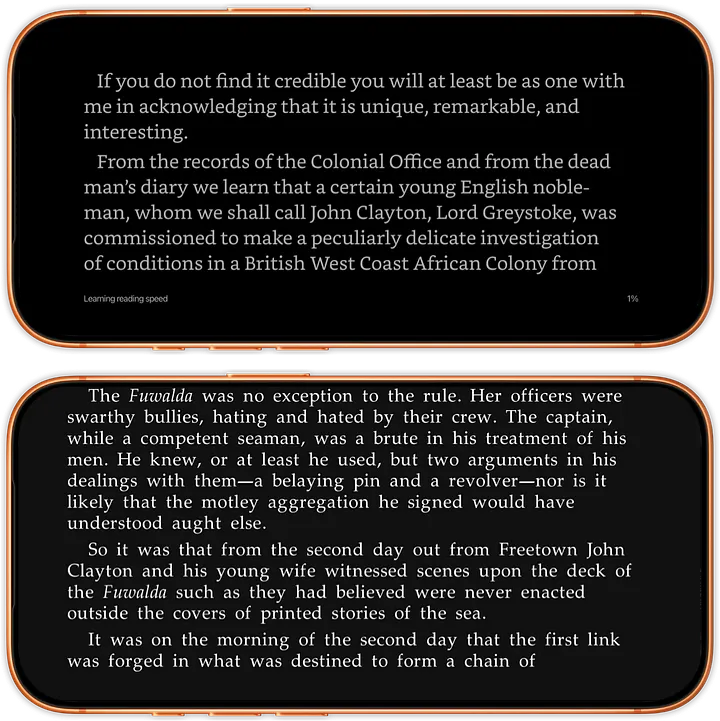
Top: Kindle, Bottom: Book Fusion
justRead supports true zero margins on all sides. Note: Text will hide behind the camera notch and rounded corners at 0 margins (screenshot below), but you control the balance between content and screen real estate.
Apple Books has fixed large margins on all sides with minimal adjustment range.
Kindle has fixed large margins on all sides with minimal adjustment range.
BookFusion cann achieve true zero margins vertically and almost horizontally, but oddly always displays a bottom margin, making text appear off-center.
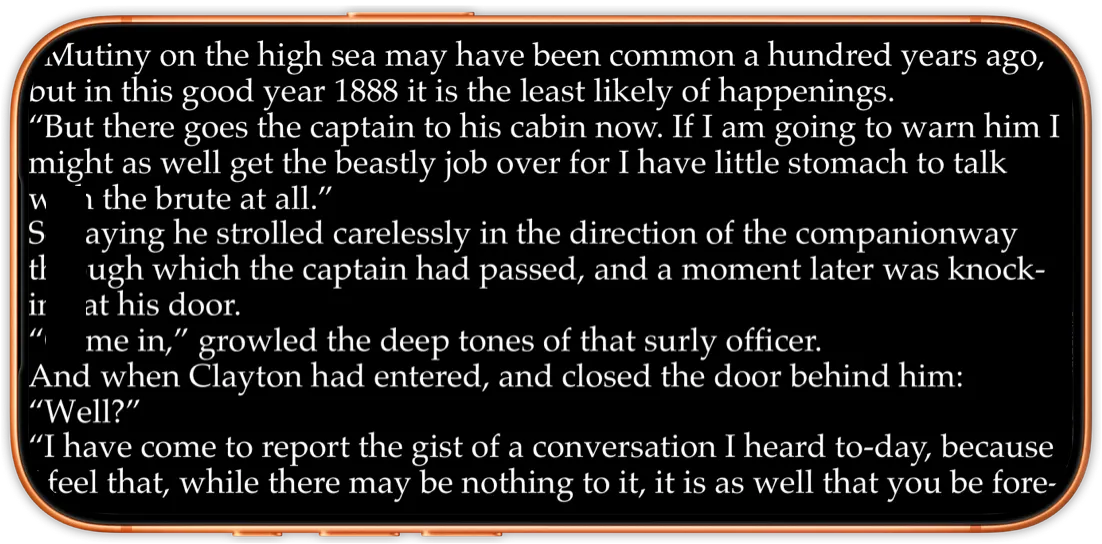
justRead, all margins zeroed.
Winner: justRead — Complete control over margins means you decide how much content fits on screen.
Landscape lock
Imagine reading in bed on your side, with your phone in portrait mode but wanting the book in landscape. Not all apps support this simple but powerful feature.
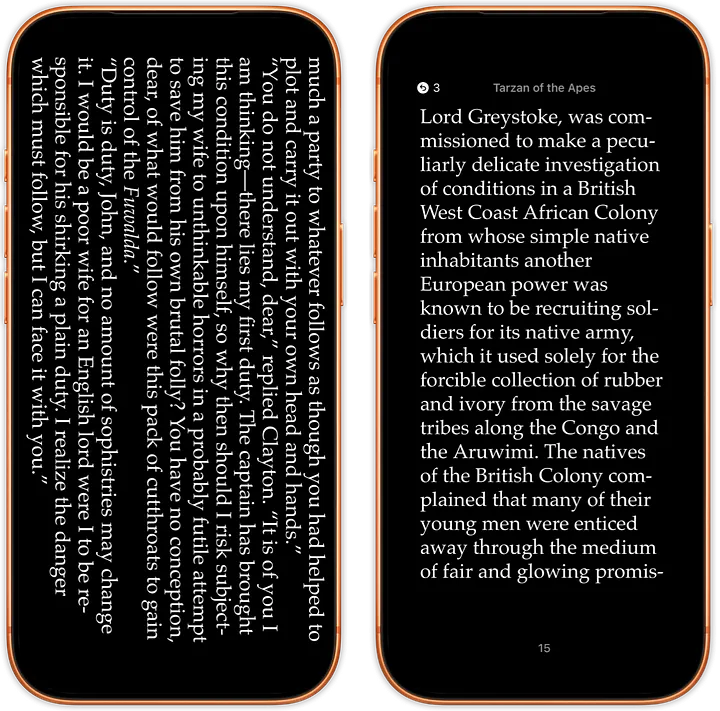
Left: justRead, Right: Apple Books
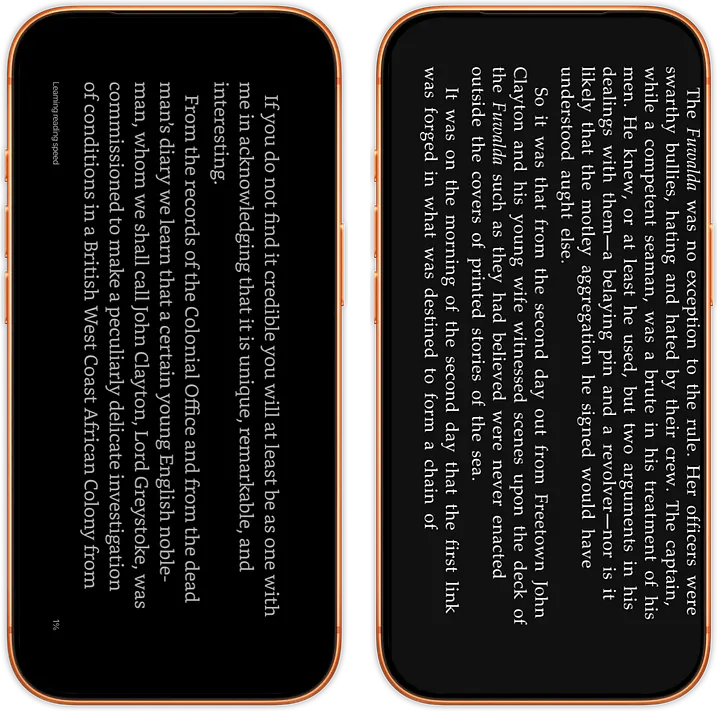
Left: Kindle, Right: Book Fusion
justRead: Supported
Apple Books: Not supported
Kindle: Supported
BookFusion: Supported
Winner: justRead, Kindle, BookFusion
Handling large libraries
Real readers accumulate libraries. Can these apps handle it?
justRead was tested with 5,000+ books imported from a folder. Initial import took ~50 seconds. Navigation remains smooth with zero stuttering, even at scale.
Apple Books imports from folders with ease and handles 5,000+ books without performance issues — a significant strength.
Kindle makes folder imports difficult (send-to-Kindle email is not practical for bulk imports), but the app likely handles large libraries fine. Testing with 5,000 books wasn’t feasible.
BookFusion requires one-by-one manual import, and in practice the app crashes when attempting to even open a library of around 5,000 files, making this limitation a serious barrier for power readers.
Winner: justRead and Apple Books — Both handle massive libraries seamlessly with practical import workflows.
Beyond the Basics: Features Unique to justRead
But the comparison above only tells part of the story. justRead includes capabilities you won’t find in Apple Books, Kindle, or BookFusion:
20–20–20 reminders
Automatic eye care prompts that follow the proven 20–20–20 rule (every 20 minutes, look at something 20 feet away for 20 seconds). Your eyes will thank you.
Rich reading statistics
Go beyond simple reading time. Track patterns, view your reading calendar, understand your habits, and celebrate milestones with detailed analytics that inspire consistent reading.
Roadmap with community voting
You don’t just use justRead; you help shape it. Vote on features you want to see, watch your feedback influence development priorities, and build the app with the creators.
Image inversion
Read novels with color inversion support. Control how images are displayed without affecting text readability. Great for reading at night.
History navigation
Jump back to any chapter, page or section instantly through a visual timeline. No more scrolling endlessly to find that scene you loved.
Text-to-speech
Listen to your books. Switch between reading and listening seamlessly — perfect for commutes, workouts, or when your eyes need a break.
These aren’t afterthoughts. They’re core to justRead’s vision of what a modern reading app should be.
The Bigger Picture
justRead emerged from a simple philosophy: respect the reader’s intelligence and preferences. Don’t force them into predefined boxes. Don’t hide power behind confusing menus. Let them choose their fonts, colors, margins, and reading direction. Make every option accessible in seconds.
Every reader is unique. Your app should adapt to them — not the other way around.
Ready to Experience the Difference?
An app designed for your reading experience, not Apple’s, not Amazon’s — yours. Complete control over fonts, colors, margins, and layouts. A library that grows with you. Reading the way it should be.
Be among the first to access justRead.
Peter
Reader, Developer, justRead Creator